
Inventory Management for Small Business in India: Fix Dead Stock, Stockouts and Expiry Losses
Most small shops do not lose money on the items they sell. They lose it on the items that sit unsold for months, the items that run out on a busy morning, and the items that expire quietly at the back of the shelf. Each of these leaks is small on any single day, which is why they last for years. Add them up over a year and they are often bigger than the shop’s rent.
Inventory management for small business is about closing those leaks with a few clear rules, not about buying the biggest software on the market. This guide to inventory management for small business explains six problems that every kirana, grocery store, pharmacy, hardware shop and small distributor faces, why each one happens, the rule that fixes it, and how a simple automation applies that rule every day without the owner having to remember. Each setup runs on the billing data the shop already has, a Google Sheet, a workflow tool such as n8n, and a phone.
What inventory management for small business really means in an Indian shop
In a real Indian shop, inventory is a moving target: mixed units, late suppliers, two branches selling at different speeds, festival swings, expiry dates and limited shelf space.
So small business inventory management comes down to answering five questions every week:
- Which items have stopped selling, and how do I turn them back into cash?
- Which items will run out before the next delivery, and who can supply them in time?
- Is the stock in the right branch, or sitting where it does not sell?
- Which items will expire before they sell, and what price will move them?
- Is each shelf earning as much as it could?
Each automation below answers one of these questions and prepares the decision; the owner approves it with one tap.
Inventory management for small business: six problems and their fixes
| Problem | What it costs the shop | The rule that fixes it | Guide |
|---|---|---|---|
| Dead stock | Cash locked on shelves for months | Pair slow items with fast sellers at a margin-safe price | Dead stock clearance |
| Late or short deliveries | Empty shelves and lost customers | Rank backup suppliers by reliability, price and speed | Backup suppliers |
| Stock in the wrong branch | One branch runs out while another overflows | Move stock by days of cover, not raw quantity | Inventory transfer |
| Near-expiry items | Write-offs and returns | A markdown ladder by days left, with a cost floor | Markdown pricing |
| Shelves arranged by habit | Best-earning items hidden at the bottom | Place items by margin earned | Planogram |
| Delivery chaos | Late orders, riders crossing each other | Route from saved pins, split fairly between riders | Route planner |
Dead stock: what it means and how to clear it
Dead stock meaning, in plain words
What’s dead stock? It is stock that has stopped moving. A simple working rule to define dead stock in a small shop: an item with no sale for 60 days, or 90 days in a seasonal business. Time since the last sale is the clearest signal, because it does not depend on how much was bought in the first place. It usually comes from buying without sales data.
Why a flat discount is the wrong first move
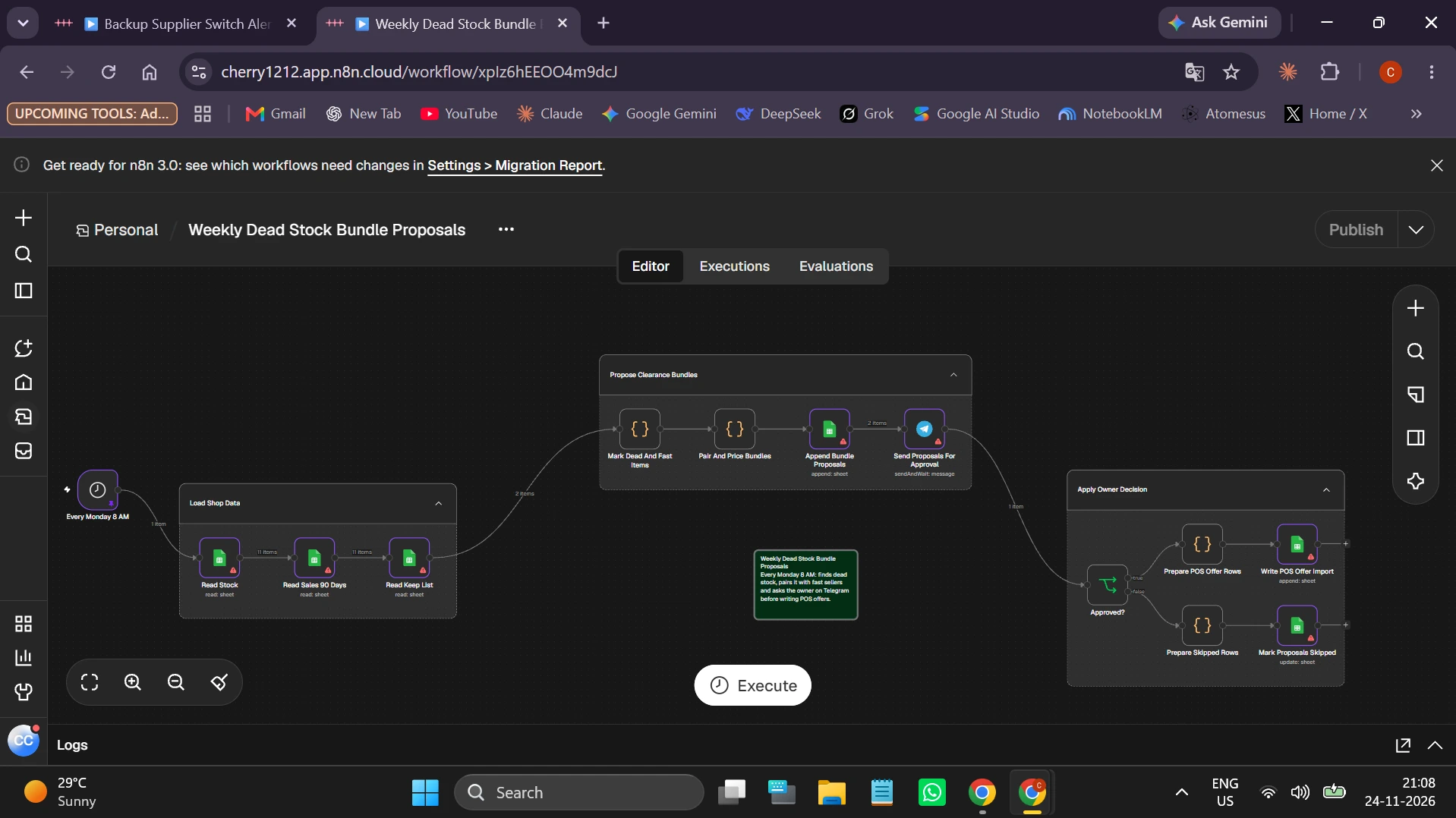
A 40% off sticker on a dead item often fails, because nobody wanted that item at full price either. Putting it in front of people who are already buying works better. The automation pairs each dead item with a fast mover from the same category, an item in the top 20% by quantity sold in the last 30 days with at least 20 pieces in stock, and offers the two as a bundle.
How the bundle price protects margin
The automation tries three discounts on the dead item, 40%, then 30%, then 20%, and uses the first one that keeps the whole bundle’s margin at or above a floor of 10%. The fast mover carries the margin; the dead item carries the discount.
Example, with illustrative numbers: a dead item sells at ₹400 and costs ₹300. Its partner sells at ₹250 and costs ₹200, so together they cost ₹500. At 40% off, the bundle would be ₹490, below cost, so it is rejected. At 30% off it becomes ₹530, with a margin of about 6%, still below the floor. At 20% off it becomes ₹570, with a margin of about 12%, so that is the bundle the owner sees.
Every Monday, the owner receives the list of new bundles to approve. After a few weeks, bundles that sold at least 10% of the dead item’s starting quantity stay; the rest are replaced. If another branch sells the same item well, moving it there beats any discount.
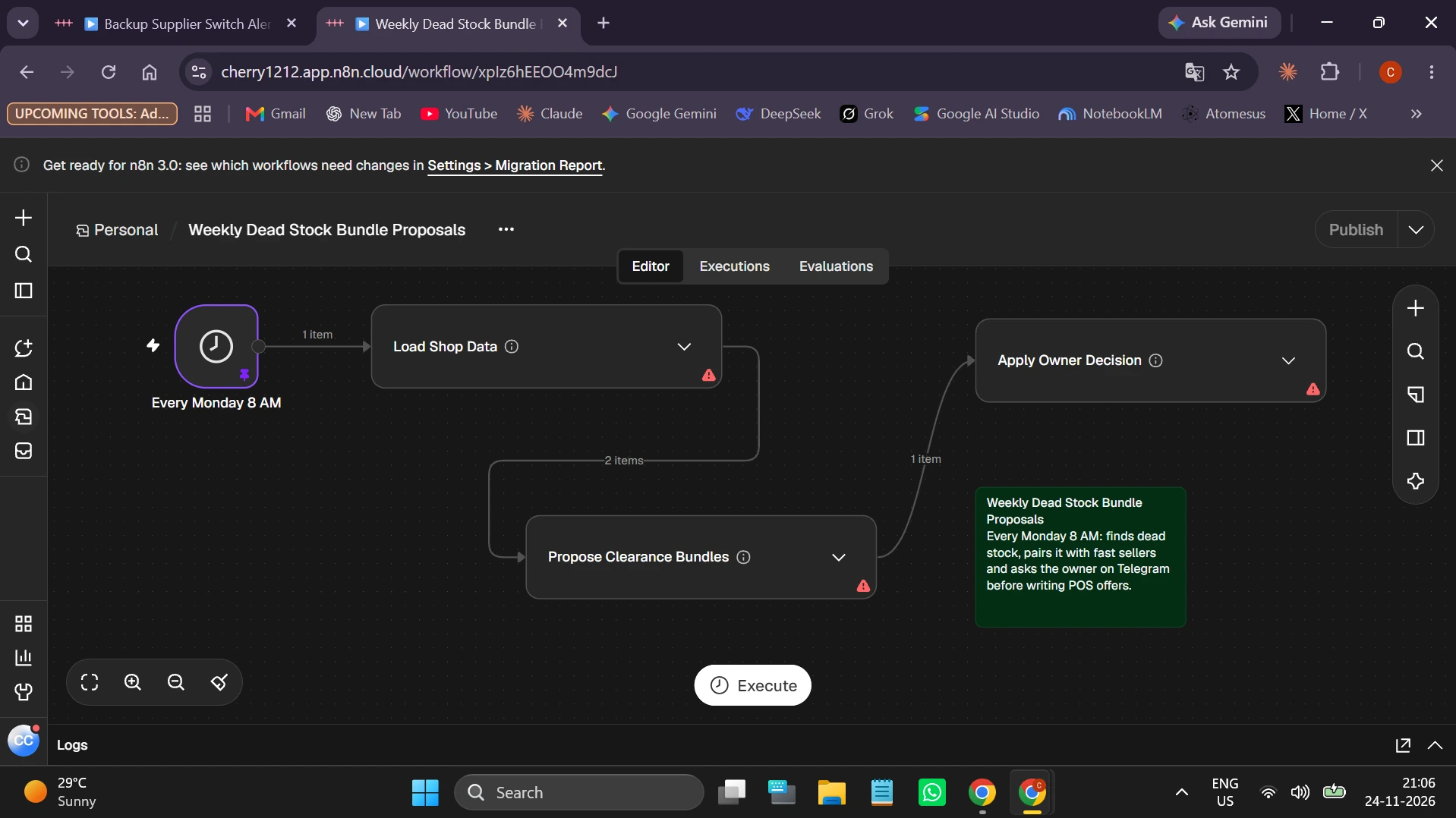
The full setup, with the sheet columns and the mistakes that make every item look 999 days dead, is in my guide to dead stock meaning and how to clear it in a small shop. ## Backup suppliers before the shelf goes empty
When a delivery counts as failed
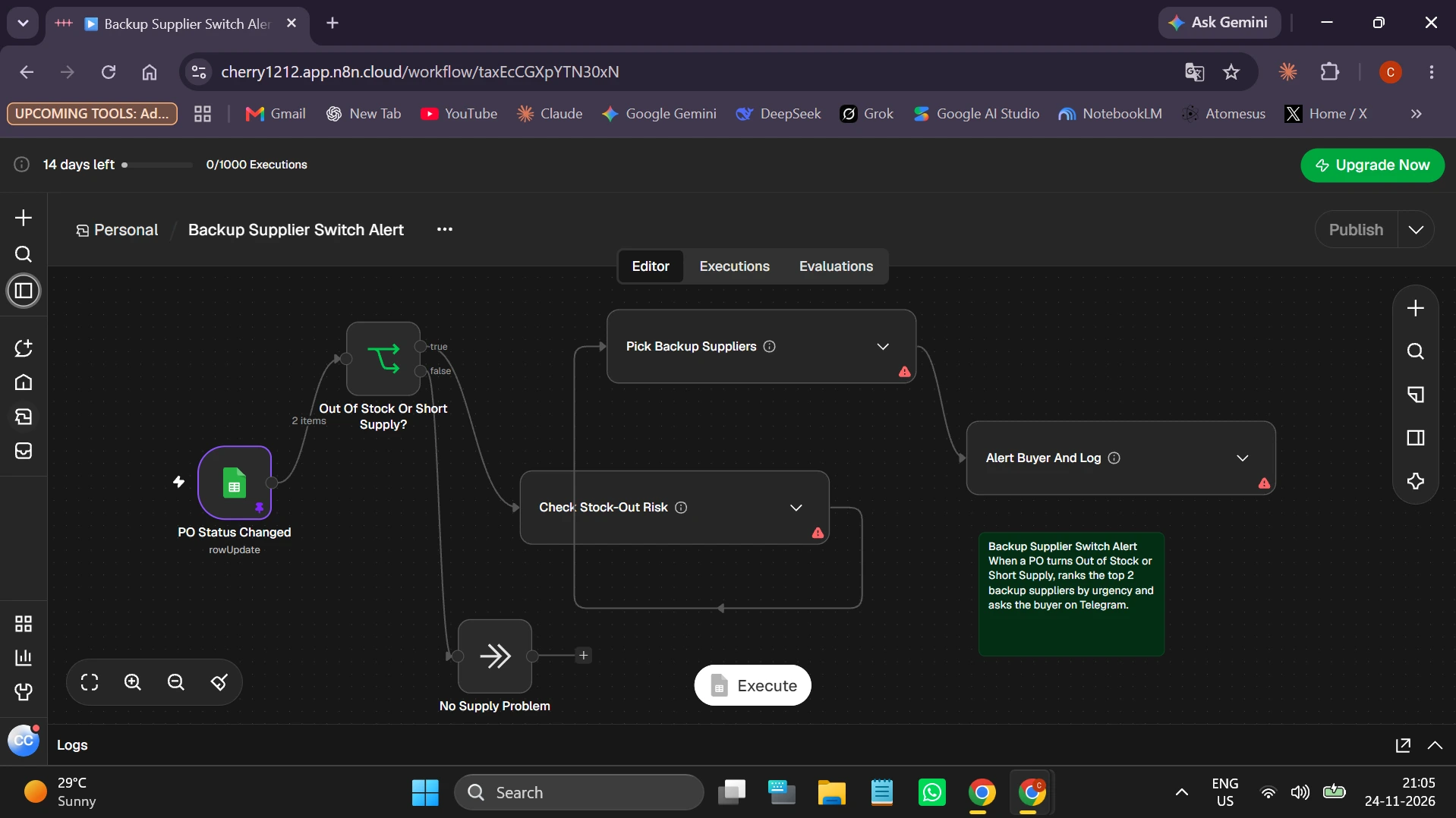
Every shop has a main supplier for each item, and every main supplier sometimes delivers late or short. The damage depends on timing: a late delivery of something with two weeks of stock left is an inconvenience, while a short delivery of a daily item on a Saturday morning empties the shelf. The automation treats an order as failed when it has not arrived by its promised time, or when the received quantity is below 80% of what was ordered. Only the shortfall becomes a new order.
How urgent is the gap?
Urgency is measured in hours, not days, because shops do not sell evenly through the day:
- Hours to stock-out = stock now ÷ (average daily use ÷ opening hours)
Items that will run out within the day need the fastest reliable supplier. Items with up to three days left balance reliability, price and speed. Items with more than three days left go to the cheapest reliable option.
Ranking backup suppliers the right way
Each backup supplier gets a score that weighs what actually matters:
- Score = 0.5 × on-time rate + 0.3 × price score + 0.2 × lead-time score
Example: supplier A is on time 90% of the time, costs ₹1,050 landed and delivers in 6 hours. Supplier B is on time 70% of the time, costs ₹950 and delivers in 24 hours. A scores 0.60 and B about 0.38, so A is offered first, even though B is cheaper. A supplier with fewer than three past orders gets a neutral 70% on-time rate, so one lucky or unlucky delivery does not decide their rank.
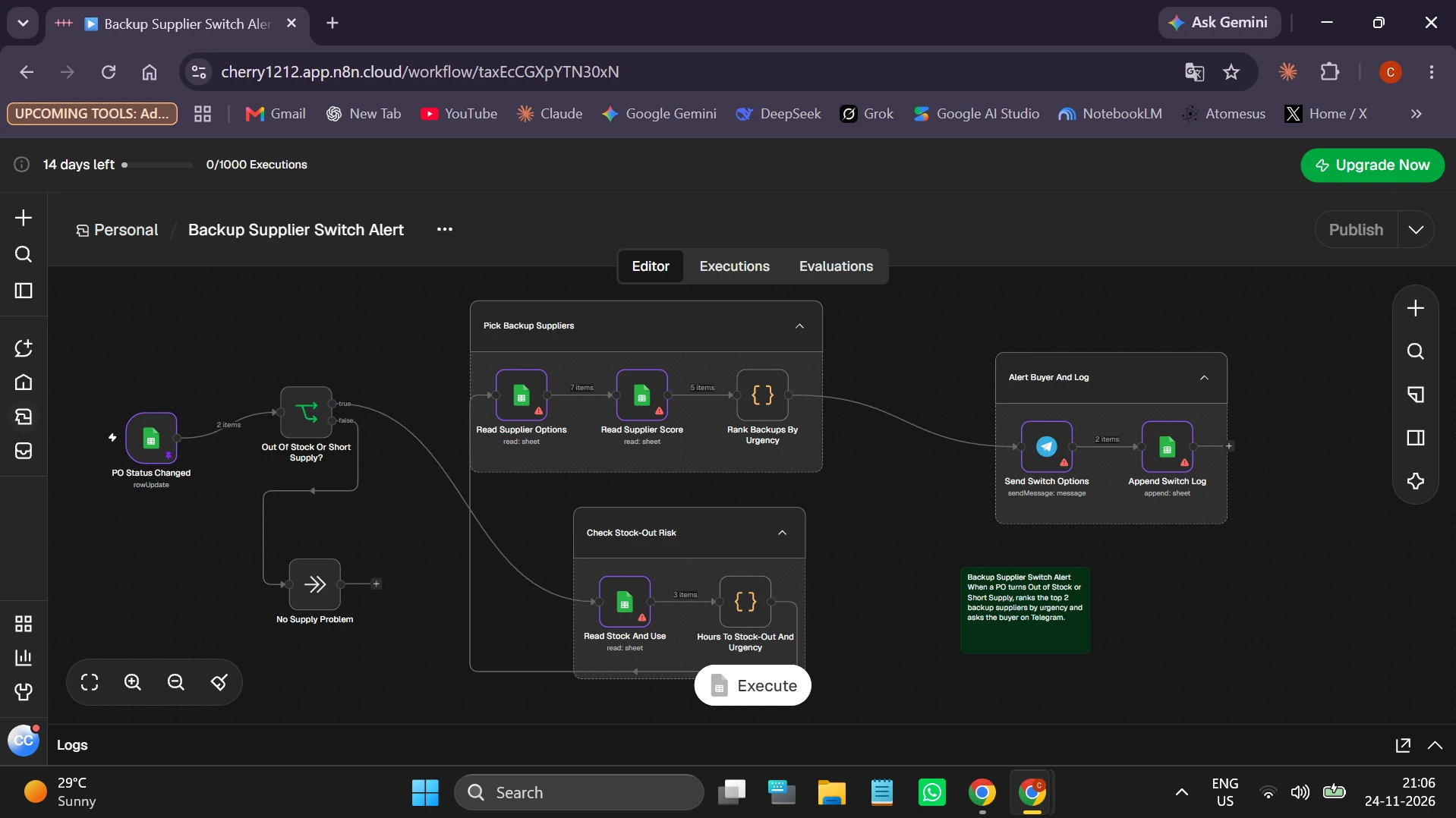
The owner gets a Telegram message with the item, the hours left and the top two backup suppliers, and approves the order with one tap. Some shops go further and let a distributor watch their stock directly. That is what vendor managed inventory (VMI), also called supplier managed inventory, means: the supplier sees the stock levels and refills before the shop has to ask. It works for a few high-volume items with a trusted distributor, but a small shop should keep the backup list either way. The full build is in backup supplier automation for late and short deliveries.
Inventory transfer between branches with days of cover
Why raw stock numbers mislead
A shop with two branches, or a shop with a godown, often has the right total stock in the wrong place. Raw numbers hide this. Six tins in the main shop and 44 tins in the second branch looks like the second branch is overstocked, but that depends entirely on how fast each one sells. The fair measure is days of cover:
- Days of cover = stock ÷ average daily sales over the last 14 days
The transfer rule
When one location has more than 30 days of cover and the other has fewer than 5, stock should move. The quantity brings the receiving branch up to the combined cover of both:
- Target cover = combined stock ÷ combined daily sales
- Transfer quantity = target cover × receiving branch’s daily sales − its current stock, rounded to whole packs
Example, with illustrative numbers: the main shop has 6 tins and sells 2 a day, so it has 3 days of cover. The second branch has 44 tins and sells 1 a day, so it has 44 days of cover. Together they have 50 tins and sell 3 a day, about 16.7 days of cover. The main shop needs 16.7 × 2 ≈ 33 tins, so about 27 tins should move.
This is warehouse inventory management at the scale of a small shop: a nightly check that compares every location, lists the transfers worth making and checks whether the trip is worth the cost. It is not a full real time inventory management system, but for two counters it gives most of the benefit, and a single IF formula in Google Sheets can do the same job for free. Small distributors who would otherwise look at wholesale inventory management software can run the same logic across their customers’ outlets. The full method is in inventory transfer between two shop branches using days of cover.
Markdown pricing for near-expiry stock
Expiry date tracking starts with batches
Grocery stores, dairies, bakeries and pharmacies write off stock every month because nobody noticed an expiry date in time. Expiry date tracking only works when each delivery is recorded as a batch with its own expiry date and quantity, because the same item can have three batches with three different dates on the shelf.
The comparison that decides everything
For each batch, the automation compares two numbers:
- Days left = expiry date − today
- Days of stock = quantity ÷ average daily sales over the last 14 days
If days of stock is lower than days left, the batch will sell on its own and needs no help. If it is higher, some units will still be there at expiry.
Example, with illustrative numbers: a batch has 4 days left and 30 units, and the shop sells 12 a day. That is 2.5 days of stock, so it will sell. With 60 units, it is 5 days of stock, and about 12 units would be left at expiry, so it gets a markdown.
The ladder and the cost floor
| Category | Days left | Discount | Action |
|---|---|---|---|
| Dairy | 3 to 4 | 15% | Markdown |
| Dairy | 1 to 2 | 30% | Markdown, moved to the front fridge |
| Bakery | 2 to 3 | 20% | Markdown |
| Bakery | 1 | 40% | Markdown, counter basket |
| Packaged food | 15 to 30 | 10% | Markdown |
| Packaged food | 7 to 14 | 20% | Bundle with a fast seller |
| OTC products and supplements | 60 to 90 | 10% | Markdown |
| Prescription medicines | Any | 0% | Return to the distributor |
While there are more than three days left, the price is never allowed below cost. In the last three days, a price below cost is allowed, because recovering something is better than recovering nothing. The full ladder, the morning message and the markdown log are in markdown pricing for near-expiry stock. ## A planogram built on margin earned
- Margin per unit = price − cost
- Margin earned = margin per unit × units sold in the last 14 days
Four groups, four places in the shop
Within each category, products are compared with the category’s median margin per unit and median units sold:
| Group | Margin per unit | Units sold | Where it goes |
|---|---|---|---|
| High and Fast | Above median | Above median | Eye level |
| High and Slow | Above median | Below median | Billing counter, or eye level in the right category |
| Low and Fast | Below median | Above median | Lower shelves; customers look for these anyway |
| Low and Slow | Below median | Below median | Lowest shelves, and reviewed for clearance |
Every Sunday, the workflow reads the sales summary from the billing system and sends a short list of moves. Before each new plan, it compares the margin earned by each slot in the 14 days after a move with the 14 days before it, so placements that did not earn more are reversed. The full routine is in a simple planogram for small retail shops.
A delivery route planner for shops with their own riders
Typed addresses in Indian towns are a poor input for any map, so the planner never routes from address text. The first time a rider reaches a new customer, he shares his location on Telegram and the point is saved against the customer’s phone number. Within about two weeks, almost all regular customers are pinned.
When orders are ready, the owner opens a short dispatch form. The workflow groups orders by pincode, sorts them by distance from the shop and hands whole groups to riders in turn, so no rider gets more than the average number of stops plus three. Each rider receives a stop list with the amount and payment type for every stop and an ordered Google Maps link, and every stop is recorded in a run log. The full setup is in a delivery route planner for local shops.
Automated inventory management: what the system actually does
Put together, these six setups are what automated inventory management for small business looks like in practice: an automated inventory management system sized for a small shop. It reads the billing export every night, calculates the numbers and sends one short message per decision; the owner approves, orders and moves the stock.
Good technology in inventory management is not about how much the software does on its own. It is about putting the right number in front of the right person at the moment they can act on it.
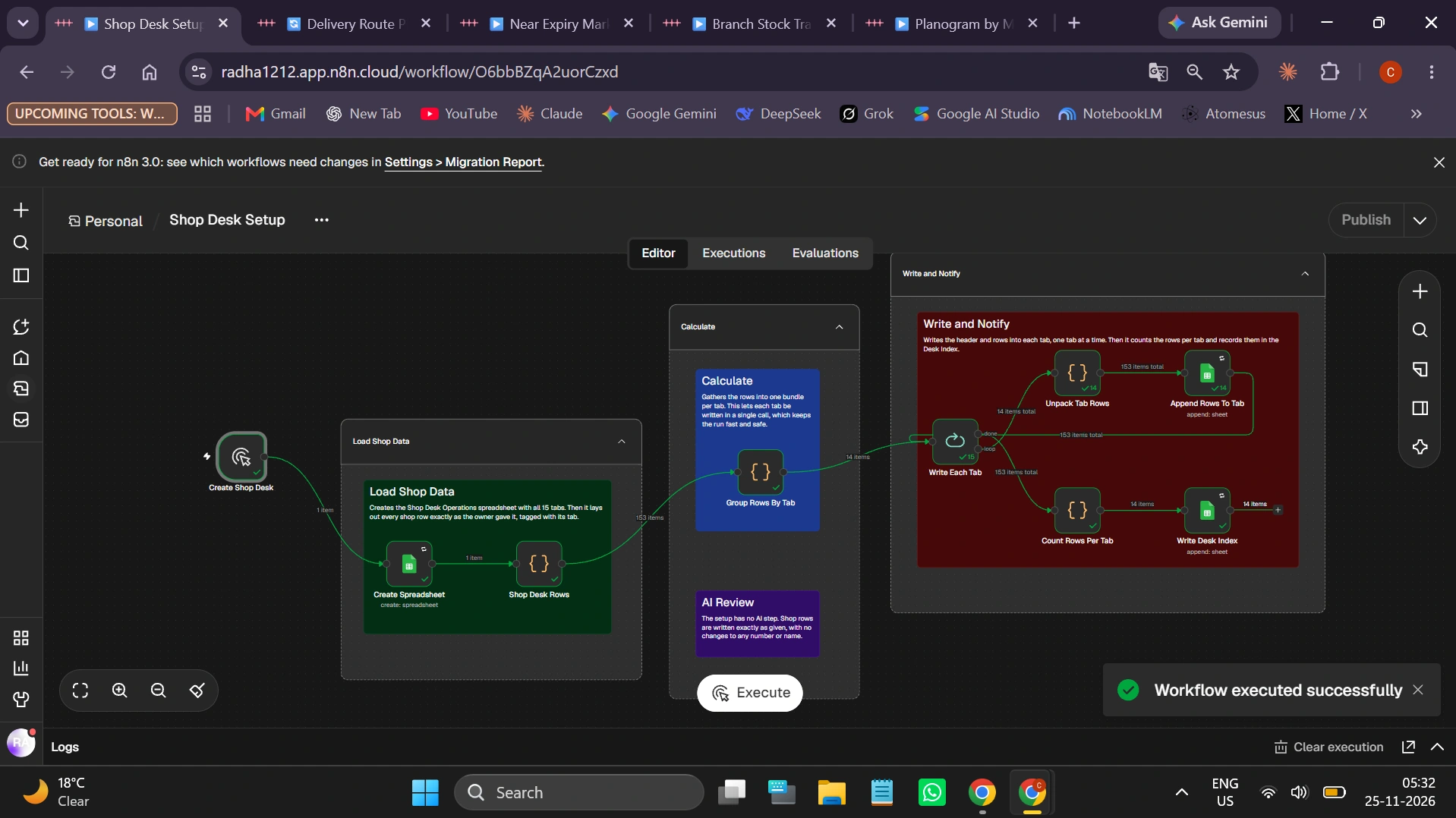
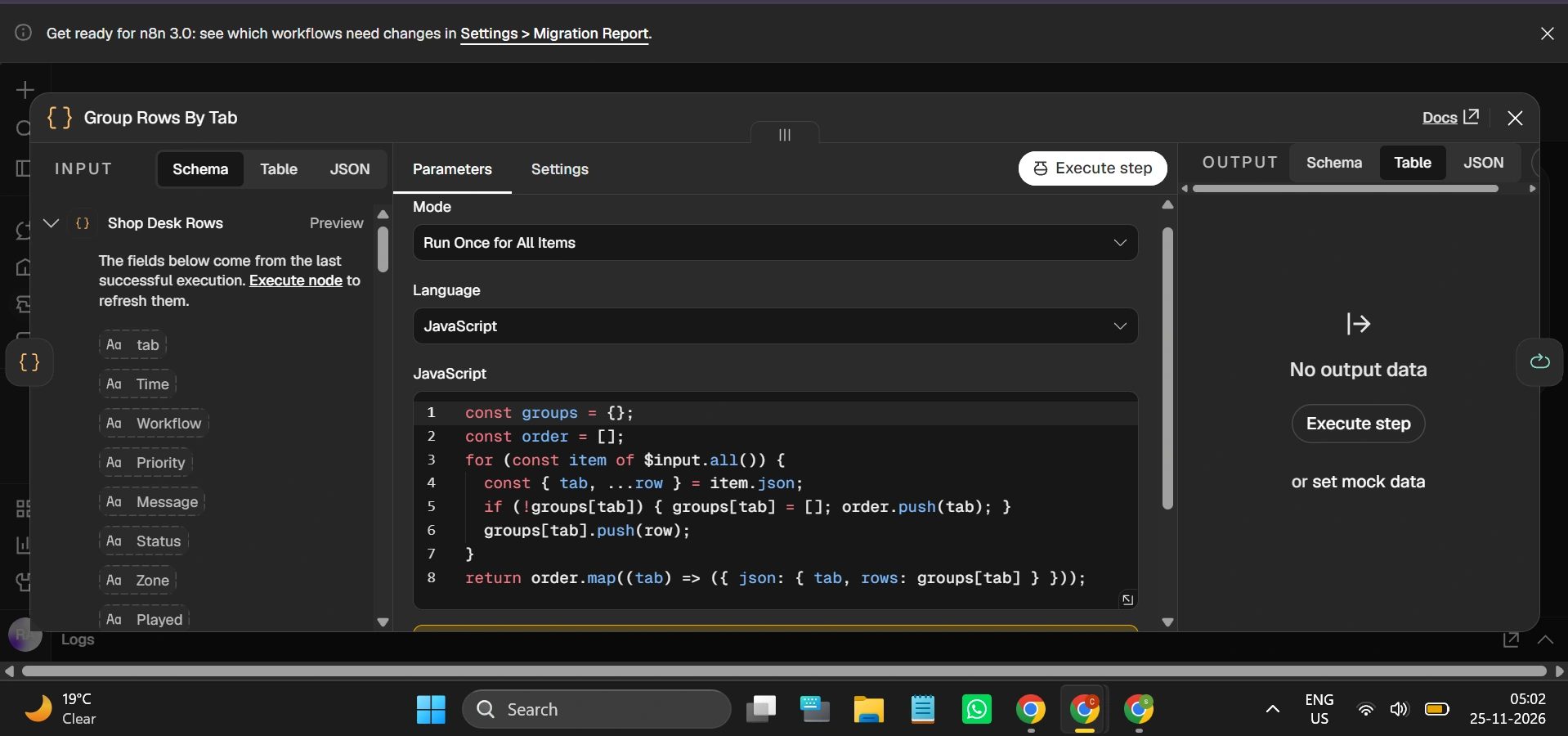
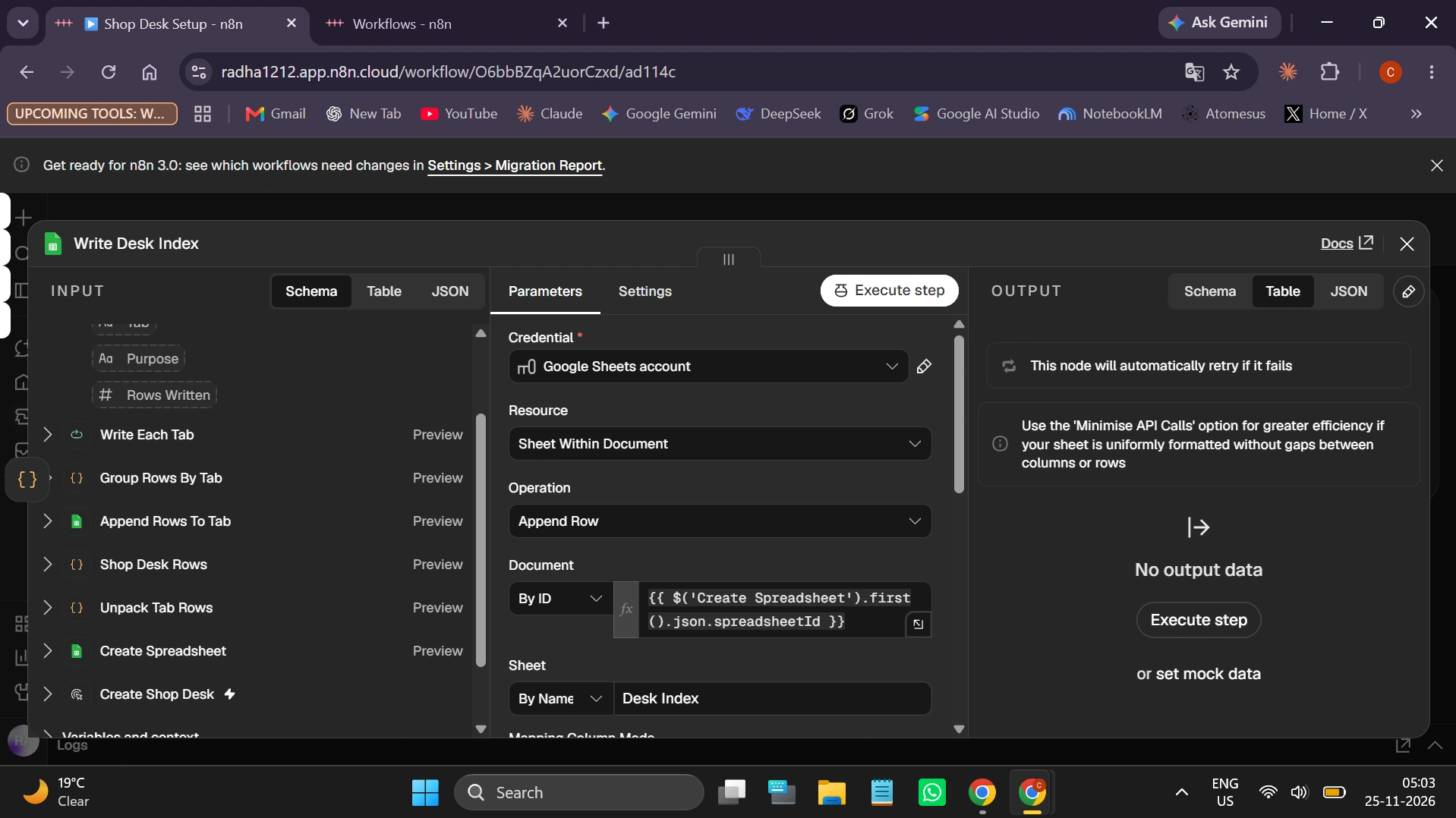
Every workflow in this guide reads from the same Google Sheet, and that sheet is built by one setup workflow we call the Shop Desk. It creates the spreadsheet with all fifteen tabs, lays out each row exactly as the owner gave it, groups the rows so every tab is written in a single call, and finally records how many rows went into each tab in a Desk Index. There is deliberately no AI step here: setup data should land exactly as given, without a model touching a name or a number. The screenshots below are from our own run, with every node green.
Cloud based inventory management or a Google Sheet?
Many owners start their search with cloud based inventory management software, and for good reason: the data is safe online, several people can see it from different places, and nothing is lost when a counter computer breaks. Inventory management cloud products usually charge per user or per outlet each month and give a full set of screens for purchase, stock and billing.
A Google Sheet is also cloud based, and for inventory management for small business it is often enough. For a single shop or two branches, a sheet plus a workflow tool delivers most of what a cloud based inventory management system does, at little or no cost, and built around the shop’s own columns and rules.
| Question | Cloud based inventory management software | Google Sheet with a workflow tool |
|---|---|---|
| Monthly cost | Subscription, often per user or outlet | Free sheet, small server or free plan |
| Setup | Learn the product’s screens | Built around your existing billing export |
| Best for | Many outlets, many users | One shop, two branches, a small distributor |
Shops that only need a simple stock list can start with free inventory management software in Excel or a shared sheet, then add the automations above one at a time.
Inventory management software for grocery stores: what to check first
Grocery is the hardest category for inventory, because it combines thousands of items, loose and packed units, fast and slow movers, and expiry dates. Before choosing any inventory management software for a grocery store, check three things:
- Batch and expiry support. Can it hold several batches of the same item with different expiry dates? Without this, markdown pricing is impossible.
- Unit conversion. Can it handle a carton bought, pieces sold, and loose weight?
- Export. Can it export daily sales and stock to a sheet or file? Every automation here starts from that export.
Grocery store inventory management software that passes these three checks will work with every setup on this page. One that fails the export check will lock the data inside the product.
How to improve inventory management in 30 days
The fastest way to start inventory management for small business is to fix one leak per week:
| Week | What to do | What you will see |
|---|---|---|
| 1 | Clean the billing data: item codes, units, dates as real dates | Numbers you can trust |
| 2 | Run the dead stock list and approve the first bundles | Cash starting to come back |
| 3 | Add backup suppliers for the 20 items that hurt most when they run out | Fewer empty shelves |
| 4 | Start batch-wise expiry tracking for dairy, bakery and medicines | Fewer write-offs |
After the first month, add branch transfers, the planogram and delivery routing as the shop needs them. Many shops also use a simple two-bin habit for their fastest items: when the first bin is empty, that is the signal to reorder, and the second bin covers the wait.
Inventory management FAQs
Do I need to change my billing software?
No. Every setup here reads the billing software’s daily export. If the software cannot export, a daily sales summary typed into a sheet still works for the dead stock and planogram rules.
Is automated inventory management expensive?
No. Google Sheets and Telegram bots are free, n8n can run on a small monthly server or free on an existing computer, and only a few steps use AI at all. The n8n documentation covers every node used.
How do I get help?
Start with the guide for the leak that costs you the most. Eligible beginners can ask my team for a free sheet-based version through Starter Support.