
Restaurant Automation for Small Kitchens, Bakeries and Sweet Shops in India
Restaurant automation does not have to mean robots, self-order kiosks or an expensive POS upgrade. For a small Indian kitchen, a bakery, a sweet shop, a mess or a cloud kitchen, it means a handful of quiet workflows that take the repeated daily decisions off the owner and the head cook. Which order should go on the fire first? Which dish started losing money when butter went up last week? How much flour does a 7.5 kg birthday order need? How many trays of each sweet should be ready three days before a festival? What price should the owner push back with when a supplier sends a new rate?
These are the questions that decide whether a food business makes money, and in most small kitchens they are answered from memory, under pressure, by the busiest person in the building. This restaurant automation guide explains each of those problems in depth: why it happens, what it costs, how the automation solves it, and what changes in the kitchen afterwards. Every setup runs on Google Sheets, a free or low-cost workflow tool such as n8n, and a phone. None of them needs coding knowledge from the owner, and none of them replaces the billing software already at the counter.
What restaurant automation means for a small Indian kitchen
In a large chain, automation in restaurants is usually bought as one big platform: ordering, inventory, payroll and reporting from one vendor. That makes sense when there are fifty outlets and a team to run the software. A single kitchen is different. Its problems are smaller, more specific and much more personal to the way that kitchen works. A sheet with one well-built workflow often solves them better than a large system nobody has the time to learn.
The restaurant automation approach my team uses is the same for every food business:
- Pick the one task that costs the most time or money every day. Not the most impressive one, the most expensive one.
- Put the data for that task in one Google Sheet, with clear columns. Cooking times, recipe lines, supplier bills or past festival sales.
- Let a workflow do the calculation and send the answer to the right person’s phone or screen. The cook sees what to start next; the owner sees which dish needs a new price.
- Keep a person in charge of the final decision. The automation gives a better number at the right moment. It never takes the decision away.
That fourth point is what separates useful restaurant automation from automation that staff quietly stop using. Kitchens run on judgment, and a system that tries to override the head cook is switched off within a week.
Six kitchen problems and the automation that fixes each one
| Kitchen problem | What it costs | What the automation does | Who gets the result |
|---|---|---|---|
| Orders cooked in arrival order | Cold plates, angry tables, waiters chasing the pass | Sorts every KOT by cooking time and flags tables waiting too long | Cooks, on a wall tablet |
| Ingredient prices rise, menu prices stay the same | Margin lost silently for months | Recalculates plate cost and margin for every affected dish | Owner, on Telegram |
| Large cake and sweet orders scaled by guesswork | Failed batches, wasted butter and flour | Scales recipes by baker’s percentage, rounds eggs, splits mixes | Baker, on Telegram |
| Leftovers or empty counters on festival days | Wasted stock or missed sales on the biggest days | Forecasts demand from past festivals and adjusts for pre-orders | Owner, for approval |
| Supplier price rises accepted without checking | Higher food cost on every purchase | Builds a one-page brief from past bills before the call | Owner, before the call |
| No FSSAI number, or rules understood from old advice | Blocked listings, rejected applications | Step-by-step registration and an annual fee reminder | Home food sellers |
The sections below take each restaurant automation problem in turn.
Kitchen order prioritization: an automated ordering system for restaurants that cooks by time
Why first-in, first-out fails on a busy night
Most small kitchens cook tickets in the order they arrive. It sounds fair, but it ignores three things the head cook is juggling at once: how long each dish takes, which station it belongs to, and how long each table has already been waiting. A table that orders a slow curry and a quick dosa gets the dosa first and the curry ten minutes later, so one plate goes cold while the other is still on the fire. Meanwhile a table that ordered early sits forgotten behind a pile of newer tickets from the counter, the waiters and two delivery apps. On a quiet afternoon the cook manages. On a full Saturday, nobody can hold all of it in their head.
How kitchen order prioritization works
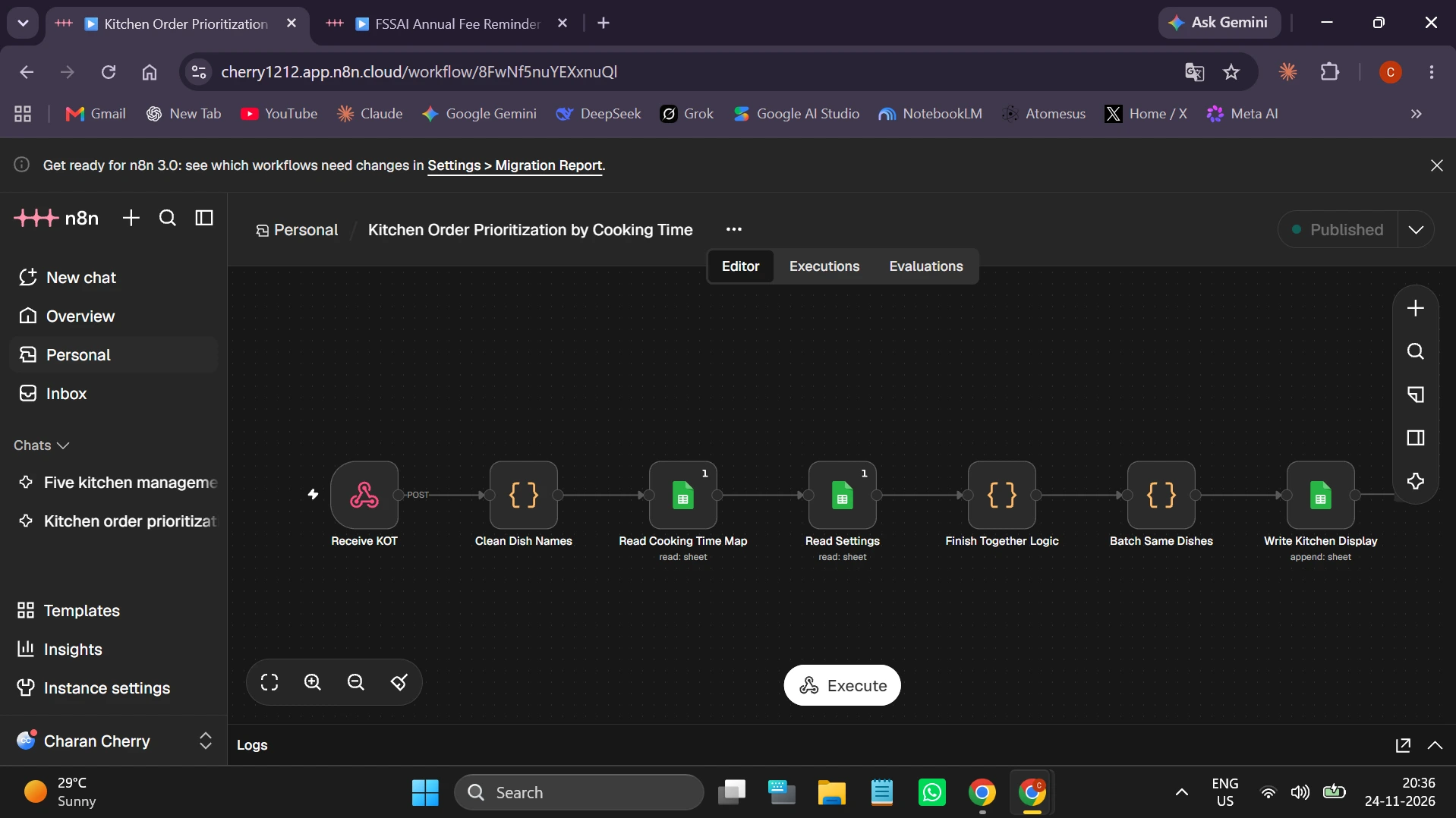
An automated ordering system for restaurants does not have to replace the billing counter. Kitchen order prioritization simply adds a layer between the KOT and the stove. One Google Sheet holds a cooking time map: every dish with its real busy-night minutes, its station (tawa, fryer, tandoor, curry, cold) and whether it can be batched. When a KOT arrives, the workflow finds the slowest dish at that table and works backwards, so every other dish starts just late enough to finish at the same moment.
Example: a table orders paneer butter masala (18 minutes), jeera rice (12 minutes) and butter naan (6 minutes). The masala starts now, the rice at plus 6 minutes and the naan at plus 12. All three reach the pass hot, together.
Two more rules make it work in real service. Any table waiting longer than 20 minutes jumps to the top of every station list in a different colour, with a separate, higher limit for festival nights when everything would otherwise turn red. And when several tables order the same batchable dish within a few minutes, the display merges them into one line, such as four masala dosas for four tables, so the tawa cook makes them together.
What changes in the kitchen
The wall tablet answers one question for each cook: what do I start next? Cooks usually learn it in about ten minutes. Waiters stop running to the pass, tables receive complete orders, and the owner can open the same screen from home. If a dish is missing from the cooking time map, the screen shows “Missing time” instead of guessing, and the head cook adds the real minutes the same day. The full build, with the sheet tabs, the eight workflow steps and the six tests before the first live service, is in my guide to kitchen order prioritization by cooking time. ## Recipe costing and menu costing when ingredient prices rise
The silent margin leak
Food cost changes every week, but most menus change once a year. When butter goes up by sixty rupees a kilo, nobody reprints the menu. The kitchen keeps selling the same dishes at the same price, the bills look busy, and at month end there is less money than the month before. Nobody can point to the day it happened, because it happened a little on every plate.
How recipe costing and menu costing work together
Recipe costing turns every dish into a list of ingredient lines: grams or millilitres, the purchase price and the usable yield. Yield matters more than most owners expect. Chicken bought at ₹240 a kilo with 65% usable meat really costs about ₹369 a kilo on the plate. Once every line is in the sheet, the plate cost of any dish is always current.
Menu costing then compares that plate cost with the selling price and a target margin for each menu section, because starters, mains and desserts rarely share one target. Two formulas do the work:
- Margin = (selling price − cost) ÷ selling price
- Restore price = cost ÷ (1 − target margin), rounded up to the next ₹5
Example, with illustrative numbers: a dish costs ₹82 to make and the target margin is 60%. The restore price is 82 ÷ 0.40 = ₹205. If the menu says ₹180, the margin is about 54%, and the dish is flagged with ₹205 beside it.
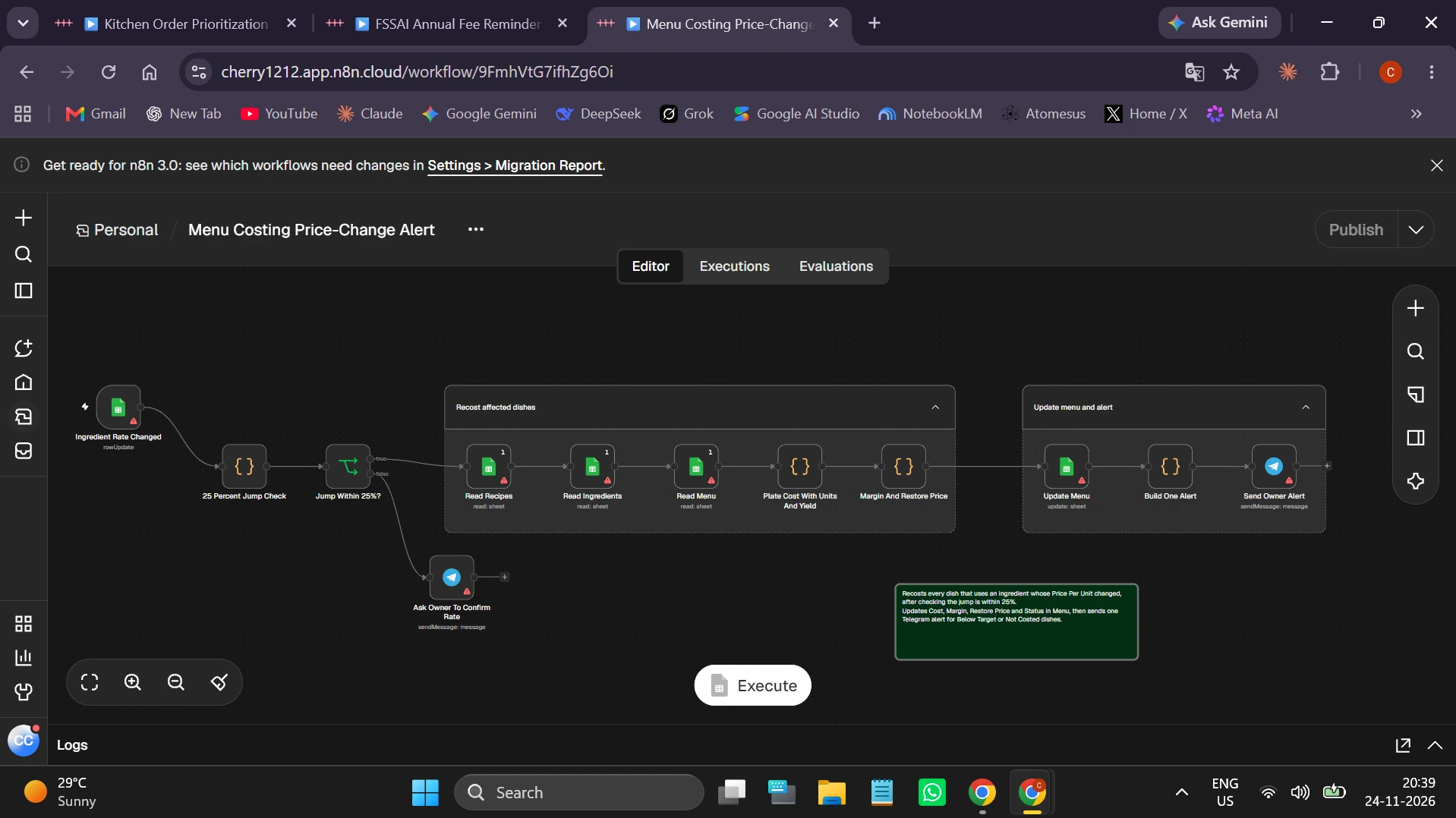
The automation runs the moment a new supplier rate is typed into the sheet. The owner gets one message per price change, listing only the dishes that fell below target, with the price that would restore each margin. A typing guard holds any jump above 25% and asks the owner to confirm, so a mistyped 5800 instead of 580 never sets off a false alarm.
What the owner does with the message
A dish below target does not always need a higher price. The order I suggest is: re-weigh the dish, because old quantities of oil, ghee and garnish are the usual hidden cause; trim something the guest will not notice; renegotiate or swap one ingredient; raise the price on dishes that can carry ₹10 or ₹15 more; and only then retire the dish. A small second workflow sends the five lowest-margin dishes every Monday morning, so even a busy owner sees the biggest leaks once a week. The three tabs, the yield formula and the six checks are in my guide to menu costing automation for restaurants.
Bakery automation with baker’s percentage and recipe scaling
Why a perfect 1 kg cake fails at 5 kg
Bakeries and home bakers lose the most money when they scale a tested recipe by simple multiplication. Some things do not scale in a straight line. Eggs come in whole pieces. Leavening behaves differently in a deep pan. Salt rounded to the nearest 5 g in a 3 kg batch becomes 15 g instead of 8 g and ruins the batch. And a home mixer has a limit, so an overloaded bowl leaves unmixed flour at the bottom.
How baker’s percentage makes any size work
Baker’s percentage writes flour as 100 and every other ingredient as a percentage of the flour weight. The recipe stops being a list of cups and becomes a ratio that works at any size. A tested cake with 250 g each of flour, sugar and egg, 200 g butter, 60 g milk, 8 g baking powder and 2 g salt adds up to 408%. Bakery recipe scaling then follows four steps: work out the finished weight, add the bake loss measured in that bakery’s own oven, find the flour from the total percentage, and calculate every other ingredient from the flour.
Worked example: for a 2.5 kg cake with a raw-to-finished ratio of 1.02, the batter is 2,550 g and the flour is 2,550 × 100 ÷ 408 = 625 g. The eggs work out to 12.5 at 50 g each, so the automation rounds up to 13 eggs and takes the extra 25 g out of the milk.
What the baker sees
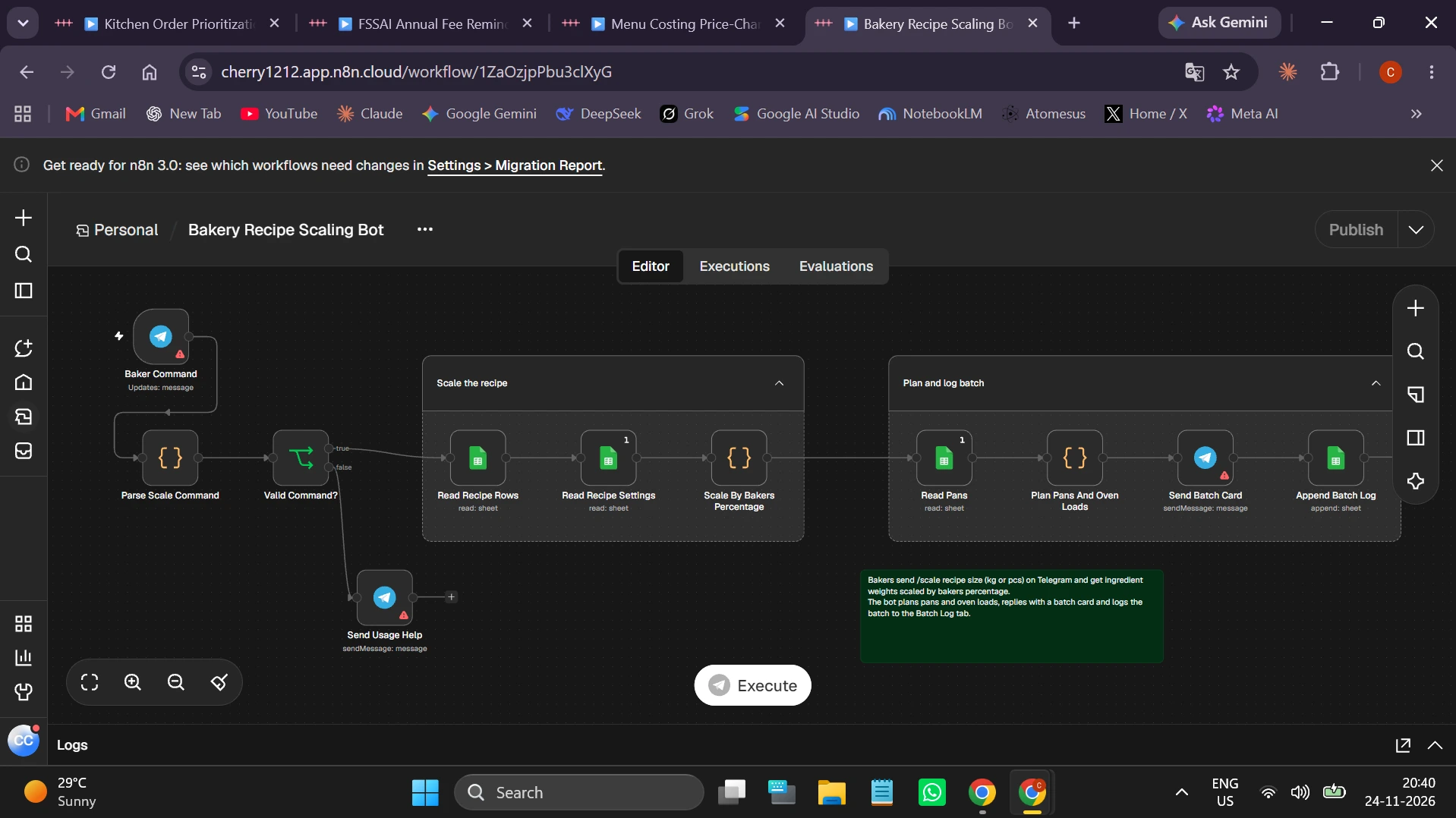
The baker types one command on Telegram, such as a recipe name and the size in kilos or pieces, and gets back a batch card: every ingredient in grams, small ingredients rounded to the nearest gram, the number of mixes, the pans to use largest first, and the oven loads. Above about 3 kg of finished cake, baking powder is reduced by a tunable factor for deep pans. Every batch is logged, so the owner can see how much butter, flour and cocoa went out each week, which also keeps recipe costing honest. The sheet layout, the pan planning and the tests are in bakery recipe scaling automation with baker’s percentage.
Festival demand forecasting for sweet shops and bakeries
The two ways a festival goes wrong
Festivals bring the biggest sales of the year and the biggest waste. Make too little and the counter is empty by noon on the busiest day. Make too much and trays of fresh sweets go to waste the day after. Most owners plan from last year’s memory, but festivals move on the calendar, so comparing the same date across two years compares the wrong days entirely.
How festival demand forecasting works
The automation lines up past festivals by day offset instead of date: the festival day is 0, the day before is −1, and so on. “Three days before” then means the same thing every year. Three corrections make the history reliable:
- Sold-out days. If an item ran out at 5 pm, real demand was higher than sales. The automation estimates it from the hours the item was actually on the counter, then trims the result by 20% to stay cautious.
- Growth. This year’s normal weeks are compared with last year’s, so a shop that has grown plans for that growth.
- Shelf life. Long-life sweets get a buffer of about 10%, cakes about 5%, and fresh cream items none at all.
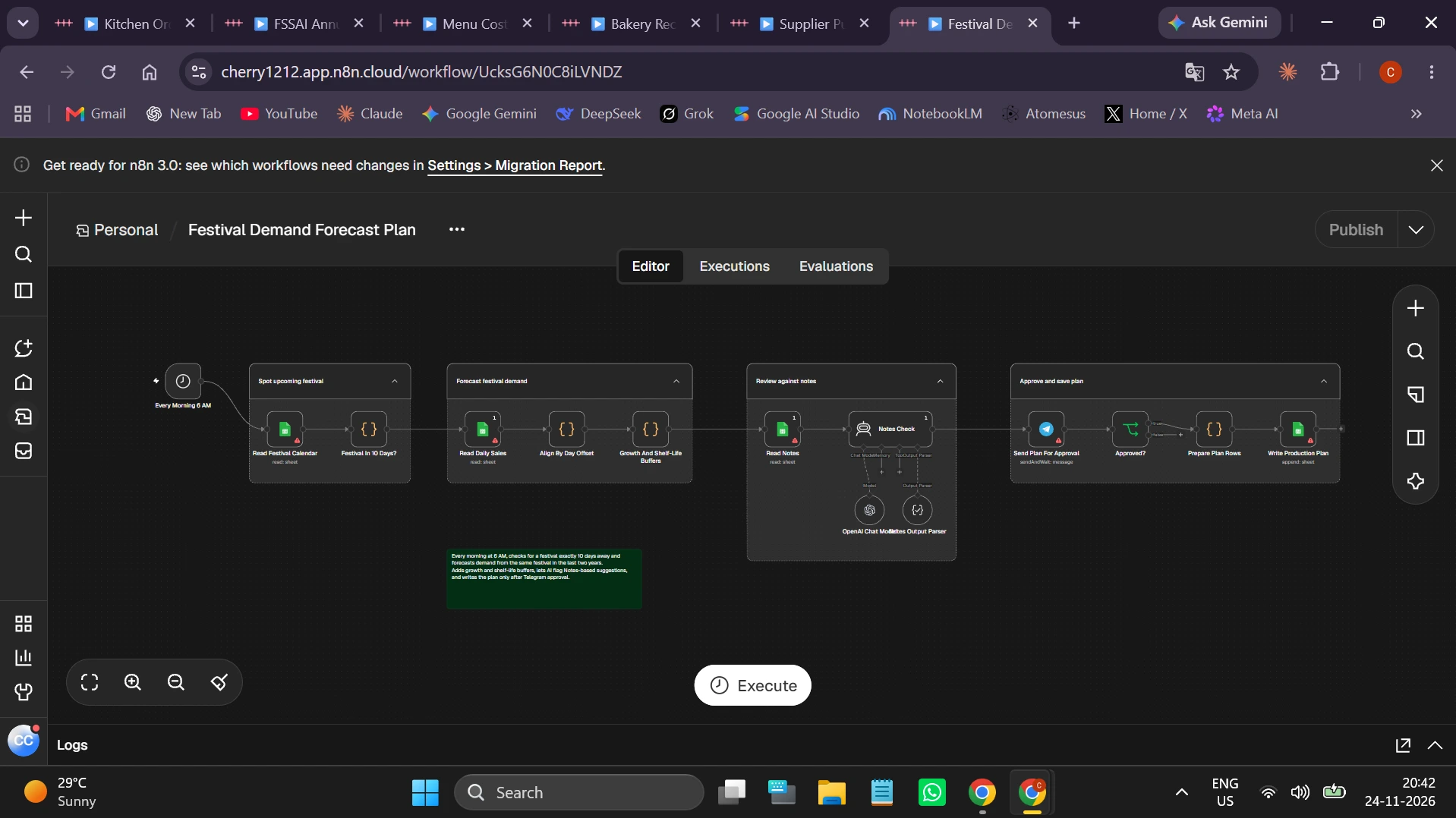
Ten days before each festival, the plan reaches the owner on Telegram for approval. Pre-orders then change it as they arrive: when bookings for an item reach 70% of the plan, the plan is raised to include the walk-in share on top of what is already booked.
What changes
The production plan is ready ten days early instead of being decided the night before, raw material can be ordered in time, and the plan compared with actual sales becomes next year’s history. An AI step may suggest a change only when it can quote a written reason from the shop’s own notes, such as a road closure. With no notes, it suggests nothing. The full method, the back-test and the mistakes to avoid are in festival demand forecasting automation for sweet shops. ## Supplier negotiation and restaurant cost tracking
Why owners lose the price conversation
Most owners negotiate supplier rates from memory, on the phone, while the kitchen is busy. The supplier knows exactly what they charged last time; the owner only remembers roughly. So a “small increase” gets accepted, and it lands on every purchase for months.
What the purchase brief contains
Restaurant cost tracking becomes far more useful when past bills sit in one sheet. Before a supplier call, the workflow prepares a one-page brief for each item: the average of the last six prices, the lowest price ever paid, the latest price, the supplier’s average delivery delay and the share of deliveries that arrived damaged. From those numbers it sets two prices: a target to open with, which is the lower of the lowest price and the average minus 3%, and a walk-away price where the owner stops.
Example, with illustrative numbers: for a 15 L tin of sunflower oil with an average of ₹2,117, a lowest price of ₹2,050 and a latest price of ₹2,200, the target is ₹2,050 and the walk-away is ₹2,180.
All the maths is done by formulas. An AI step writes exactly three plain talking points, and it is not allowed to change a number or invent a competitor’s quote. Items with fewer than three purchases on record show “Not enough history” instead of a target. After the call, the agreed price goes back into the sheet, so the next brief starts from the real deal. The full setup is in supplier negotiation automation with a purchase brief.
FSSAI registration for a home food business
Before any restaurant automation matters, a food business has to be allowed to sell. Delivery apps, packaging labels and many customers all expect an FSSAI number. From 1 April 2026, FSSAI raised the basic registration limit to an annual turnover of ₹1.5 crore, so almost every home kitchen now needs only basic registration, not a state licence. New registrations no longer expire, but the ₹100 government fee for basic registration is still due every year, and an unpaid fee can lead to suspension.
The application on the official FoSCoS portal takes about eleven steps, from choosing the state and food categories to downloading the certificate with the 14-digit number. Agents often charge ₹999 to ₹3,000 or more for something an owner can do themselves. The step-by-step process, the common rejection reasons and a simple annual fee reminder are in my guide to FSSAI registration for a home food business.
Automate restaurant reporting without a dashboard subscription
Once orders, costs, recipes and purchases live in Google Sheets, restaurant automation makes reporting almost free. Each report is a short scheduled workflow that reads a sheet the kitchen already keeps, so there is no separate reporting tool to pay for or learn.
| Report | Built from | How often | What it tells the owner |
|---|---|---|---|
| Lowest-margin dishes | Menu costing sheet | Every Monday | Which prices or recipes to fix first |
| Ingredient use by week | Bakery batch log | Weekly | Where butter, flour and cocoa really went |
| Tables that went urgent | Kitchen display history | Daily | Which hours and dishes slow service down |
| Festival plan against actual sales | Production plan and daily sales | After each festival | How to plan the next festival better |
| Supplier delays and damage | Purchase history | Before each supplier call | Which supplier to push, and which to replace |
Restaurant automation software or a sheet-based setup?
Both have a place, and the right choice depends on the size of the business rather than on which looks more modern. Ready-made restaurant automation software suits businesses that want everything in one product and can pay a monthly fee per outlet. A sheet-based setup suits single kitchens that want to fix one problem at a time, keep their existing billing system and own their data.
| Question | Ready-made software | Google Sheets with a workflow tool |
|---|---|---|
| Monthly cost | Subscription, usually per outlet | Free sheet, small server or free plan |
| Fits your exact process | Only as far as the product allows | Built around your columns and rules |
| Staff training | New screens and menus to learn | Usually one screen or one Telegram message |
| Your data | Inside the vendor’s system | In your own Google account |
| Best for | Chains and larger outlets | Single kitchens, bakeries, sweet shops |
A sensible restaurant automation path for many owners is to start with sheets, learn which numbers actually matter, and move to a larger product only when the business outgrows the setup.
What these setups cost a small kitchen
The restaurant automation setups in this guide avoid per-order fees. Google Sheets and Telegram bots are free. n8n can run on a small monthly cloud server or free on a computer already in the business; the n8n documentation covers every node used. The one-time costs are the setup itself and, only for the kitchen display, a basic tablet with a cover and wall mount. Just two steps use AI, the festival forecast notes and the supplier talking points, and they add a small usage charge. Every other workflow here runs without AI, so the numbers are always exact.
Where to start with restaurant automation
Start with the problem that costs the most, not with the most impressive one. For most small kitchens, this order works:
| Step | Setup | Why at this point |
|---|---|---|
| 1 | FSSAI registration in place | Required before selling food at all |
| 2 | Menu costing | Shows which dishes are losing money today |
| 3 | Kitchen order prioritization | Fixes service on busy nights |
| 4 | Supplier purchase brief | Protects margins at every price change |
| 5 | Recipe scaling or festival forecasting | For bakeries and sweet shops with large orders |
Run each restaurant automation setup for a few weeks before adding the next, and check that it is actually changing what people do. If you have never built a workflow before, automation for small Indian businesses without coding explains the basic idea in plain language.
Restaurant automation FAQs
Do I need to change my billing software?
No. The kitchen order setup can receive orders from a billing system that can send them out automatically, and where that is not possible, a waiter or cashier adds a row to the sheet. The costing, scaling and forecasting setups do not touch billing at all.
Do I need to know coding?
No. My team builds and tests the workflows. The owner and staff only use a sheet, a tablet screen or Telegram messages.
Does restaurant automation use AI?
Only where it helps. Costs, margins and recipe amounts are calculated by formulas or code so the numbers are exact. AI is used only for short written notes, such as supplier talking points, and is never allowed to change a number.
Is this only for restaurants?
No. The same restaurant automation setups work for messes, cloud kitchens, tiffin services, bakeries, sweet shops and caterers. The cooking time, costing and forecasting logic stays the same; only the sheet names change.
How do I get help setting this up?
Read the guide for the problem you want to fix first. If you are just starting and cannot pay for a full build yet, ask through Starter Support.