
About Us
The argument in favor of using filler text goes something like this: If you use real content in the Consulting Process, anytime you reach a review point you’ll end up reviewing and negotiating the content itself and not the design.
Selling More, Saving Less? Menu Costing Automation That Reprices Every Dish When Butter Goes Up
Selling More, Saving Less? Menu Costing Automation That Reprices Every Dish When Butter Goes Up
Menu Costing Automation for Restaurants When Ingredient Prices Rise
Butter goes up by sixty rupees a kilo and nobody changes the menu. The restaurant keeps selling the same dishes at the same price, the bills look busy, and at month end there is less money than last month. Menu costing automation stops that leak on the day the price changes, not three months later. It is one of the restaurant automation setups that pays for itself fastest.
Here is an example of what the owner gets on the phone the moment a new supplier rate is typed in:
Butter rate changed: ₹520 → ₹580 per kg. 2 dishes below target. Paneer Butter Masala: cost ₹96, margin 52%, restore price ₹240. Butter Naan: cost ₹14, margin 53%, restore price ₹35.
One message per price change, not one per dish. Everything below explains how that message is built.
Three tabs hold the whole menu costing
The menu costing sheet is called Kitchen Costing. The Ingredients tab has Ingredient, Unit, Price Per Unit, Yield Percent, Supplier and Last Changed. The Recipes tab has one row per ingredient per dish: Dish, Ingredient, Quantity and Unit. The Menu tab has Dish, Selling Price and Target Margin, which the owner fills, and Cost, Margin, Restore Price and Status, which the workflow writes back. Status is one of Below Target, OK or Not Costed.
The Unit column is a dropdown with only g, kg, ml, l and piece. That one rule prevents the most expensive mistake in costing, which I cover further down.
If the kitchen already runs a cooking time map for KOTs, the dish names should match it exactly, so both sheets speak the same language.
The three formulas, with one worked example
Yield first. Usable cost = purchase price ÷ (Yield Percent ÷ 100). Chicken bought at ₹240 a kilo with 65% usable yield really costs about ₹369 a kilo on the plate.
Then the plate cost. Grams become kilos and millilitres become litres before multiplying, so a 30 g line is never priced as 30 kg. The workflow adds every line of the dish. If an ingredient is missing from the Ingredients tab, the dish is marked Not Costed instead of counting that ingredient as zero.
Then the margin and the price that restores it.
- Margin = (Selling Price − Cost) ÷ Selling Price
- Restore Price = Cost ÷ (1 − Target Margin), rounded up to the next ₹5
Example, with illustrative numbers: a dish costs ₹82 to make and the target margin is 60%. Restore Price = 82 ÷ 0.40 = ₹205. If the menu says ₹180, the margin is about 54%, so the dish is flagged Below Target with ₹205 beside it. When the Target Margin cell is empty, the workflow uses 60%.
Guarding against typing mistakes
A cashier who types 5800 instead of 580 would make every butter dish look like a disaster. So the workflow first checks the size of the jump:
jump = (new price − old price) ÷ old price
If the jump is bigger than 25% either way, nothing is recalculated. The owner gets a single “please confirm this rate” message, and the costing runs only after the price is typed again.
The menu costing build in n8n, node by node
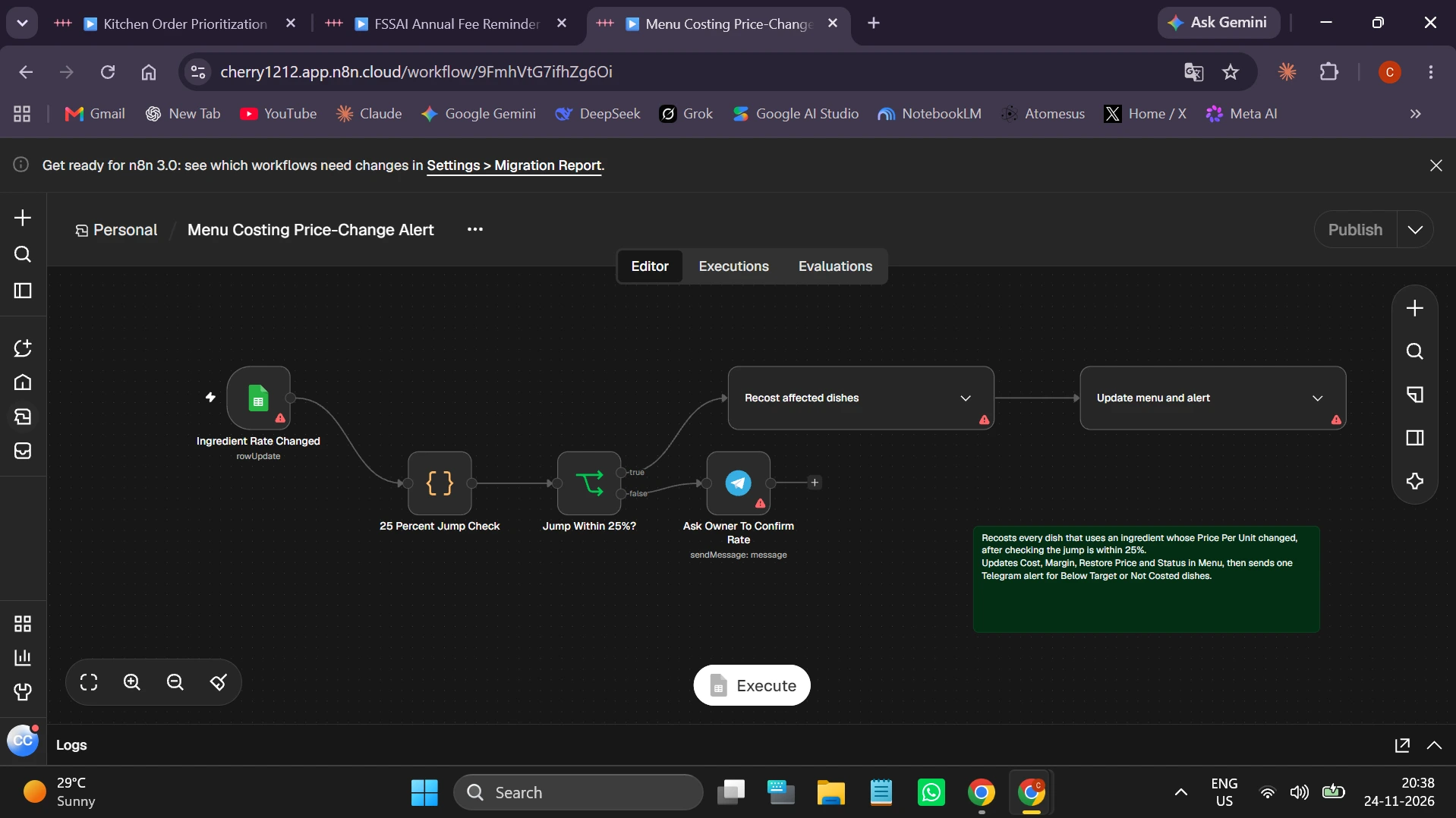
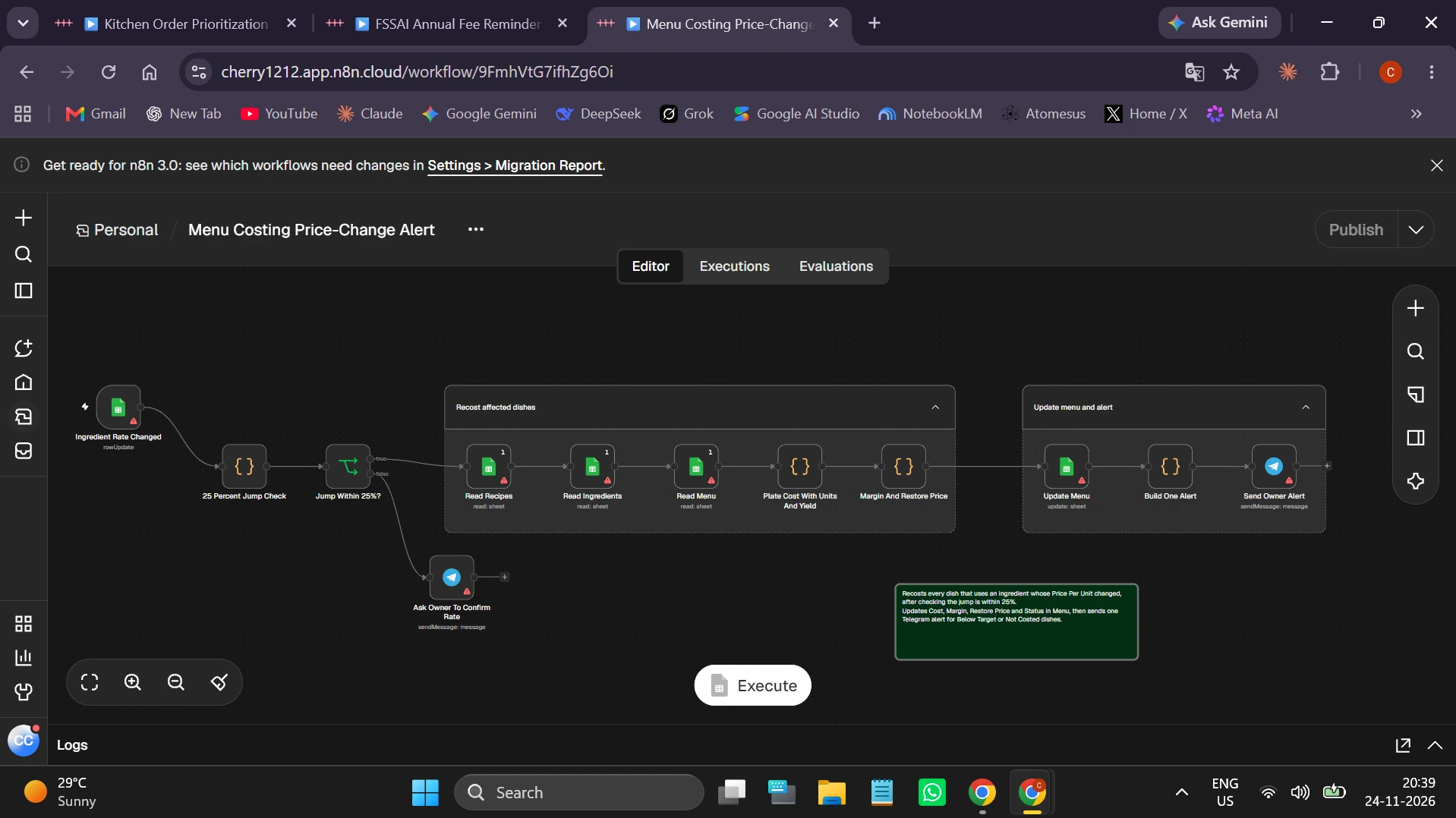
The workflow starts with a Google Sheets Trigger on the Ingredients tab, watching the Price Per Unit column and polling every minute. A Code node runs the 25% check. A Google Sheets node then finds every recipe line that uses the changed ingredient, and a second one reads all lines of those dishes, because the full plate has to be recosted, not just the changed line.
Two Code nodes do the maths: one applies units and yield and sums the plate cost, the other calculates margin, restore price and the below-target flag. A Google Sheets Update node writes Cost, Margin, Restore Price and Status into the Menu tab, matching on Dish. Finally an IF node keeps only dishes that are below target or not costed, and one Telegram message goes to the owner, or to a group if the manager should see it too. The Telegram bot is created through BotFather, and the owner sends it one message first so it knows where to reply. The n8n documentation covers each of these nodes.
When someone pastes a whole new rate list at once, add a two-minute Wait node after the trigger and merge the changes, otherwise the owner receives a flood of messages.
What to do when a dish falls below target
When menu costing flags a dish, I ask owners to go through this ladder in order:
- Check the recipe line. Re-weigh the dish. Old quantities, especially oil, ghee and garnish, are the usual reason margins look fine on paper and the money is still short.
- Trim something the guest will not notice, such as a little cooking fat or garnish, never the main item.
- Swap or renegotiate one ingredient. Put a trial supplier in the Ingredients tab and compare. A purchase brief built from price history makes that conversation much easier, and a new supplier should pass a GST number check before you pay any advance.
- Raise the price on dishes that can carry ₹10 or ₹15 more.
- Retire the dish.
Write each decision with the date in the Status column, so next month you know what was already tried.
The Monday worst-five list
A second, tiny workflow runs every Monday at 10 am. It sorts the Menu tab by margin and sends the five weakest dishes with their restore prices. Owners who do nothing else still see their biggest leaks once a week.
Six checks before you trust the numbers
| Test | What you type | What should happen |
|---|---|---|
| Normal rise | Butter 520 → 580 | One message listing butter dishes with cost and restore price |
| Typing error | Butter 580 → 5800 | Held, only a “please confirm” message |
| Unit mix | 25 ml cream | Costed as 0.025 litre |
| Yield | Chicken yield 65 | Chicken dishes cost about 1.54 times the full-yield cost |
| Missing item | Saffron not in Ingredients | Dish marked Not Costed |
| Price fall | Lower oil rate | Menu updates quietly, no alert if margins are fine |
Errors I see most often
- The trigger never fires. The column header in the node does not match the sheet exactly, for example “Price per unit” against “Price Per Unit”. Copy the header text into the node.
- A dish suddenly costs thousands. Someone typed “Gms” or “grams” as the unit. This is why the Unit column is a dropdown.
- Margins look healthy but cash is short. The recipe quantities are wrong. Re-weigh the top ten sellers.
Running it without n8n, and the running cost
The same three rules work on any platform: convert every unit, include yield loss, and compare against a target margin per menu section. In Make, the costing uses an Iterator and Aggregator. In Zapier, one Code step does the maths. Inside Google Sheets alone, Apps Script with an onEdit trigger can do it all and send the Telegram message itself.
Google Sheets and Telegram bots are free, and there is no AI model in this menu costing setup, so there is no per-message charge. The only running cost is a small n8n server or a starter cloud plan. Bakeries use the same sheet with recipes per batch and a Pieces Per Batch column, which pairs naturally with scaling recipes by baker’s percentage.
The one habit that makes it work
The person who receives supplier bills types the new rate into the Ingredients tab the same day. That is the whole discipline. When my team sets this up, we spend half a day weighing dishes with the chef and collecting the latest bills, then half a day agreeing target margins per menu section, because starters and desserts rarely share one target. If coding feels like a barrier, read how small Indian businesses automate without coding first.

I am Radhakrishna, Founder and lead author at UpcomingTools.com, where I write Business Guides and Automation Guides for low investment automation in India. With 3 to 5 years offline experience serving small businesses only through trust and referrals, I now build software only workflows for lead follow up, bookings, quotes, stock, invoices and reporting and fix failed runs, expired tokens and unsafe AI and RAG answers. Every guide and workflow is written and decided by me, personally checked and live tested before publishing. I build in your own accounts on live, so your keys stay yours, show a rough demo before build and give 3 to 6 months free support with free tool help and ZERO SERVICE CHARGE for eligible starters.
4 Comments
[…] a pharmacy chain balancing slow medicines before they near expiry. For restaurants, it pairs with menu costing. For businesses with any expiry stock, moving it to the branch that sells faster is often better […]
[…] orders flow well, the next leaks are usually money and planning: menu costing when ingredient prices rise, scaling bakery recipes with baker’s percentage, festival demand forecasting and a purchase […]
[…] calendar will find most of the inputs are already in place, and the same production plan can feed menu costing so festival prices are set on real […]
[…] margin floor is the same number a menu costing sheet produces, so a business that already costs its menu has half the work […]