

About Us
The argument in favor of using filler text goes something like this: If you use real content in the Consulting Process, anytime you reach a review point you’ll end up reviewing and negotiating the content itself and not the design.
The AI Calling Agent for Lead Generation I Set Up for Indian Small Businesses
The AI Calling Agent for Lead Generation I Set Up for Indian Small Businesses
The AI Calling Agent for Lead Generation I Set Up for Indian Small Businesses
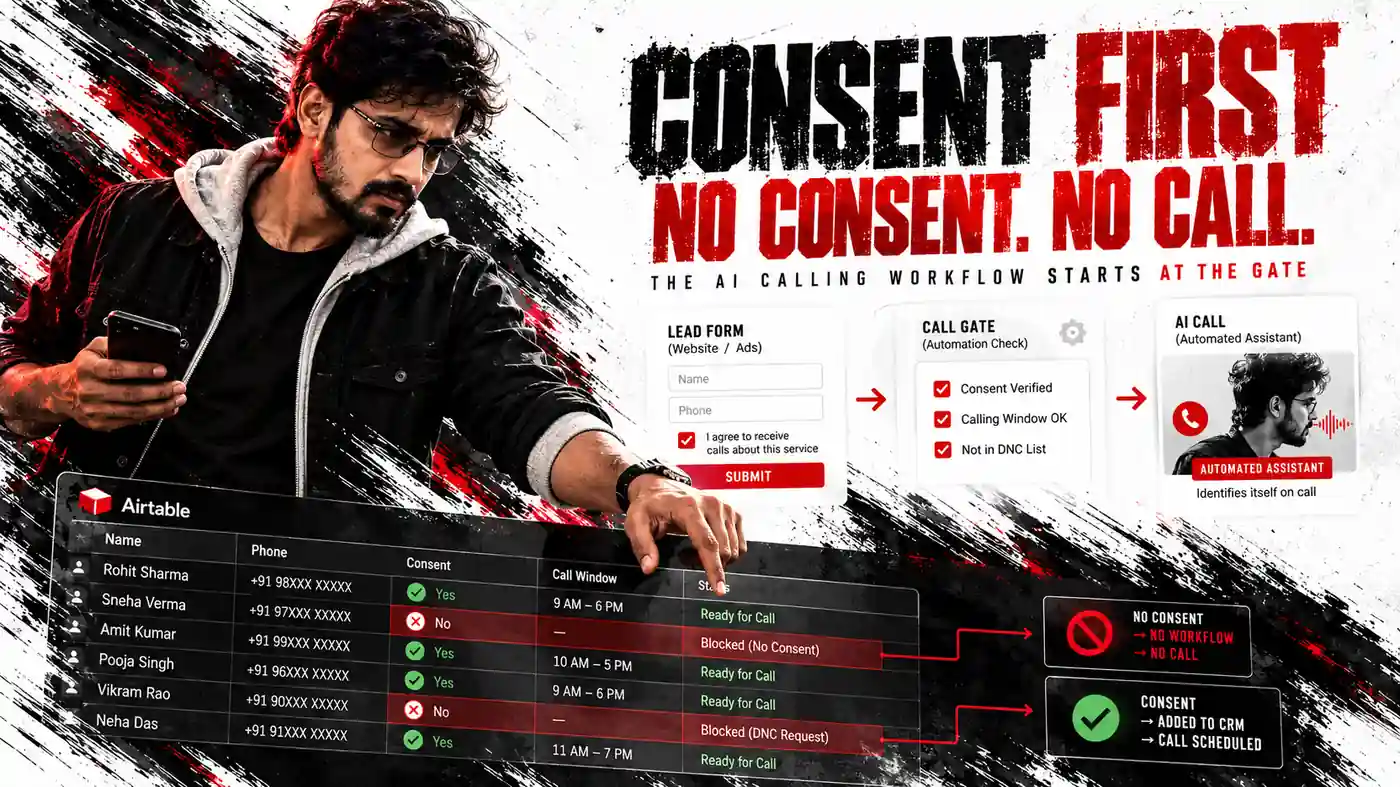
Before an AI calling agent for lead generation calls any Indian number, the lead must have clearly consented and the workflow must refuse the call when consent is missing. The business must also confirm the current TRAI requirements for its number, calling purpose and telecom setup.
Speed comes after those conditions. A fast call is useful only when the person agreed to receive it and can easily ask for future calls to stop.
Should an AI calling agent for lead generation make the call?
Consent is the first filter, not a note added after the automation is built.
Commercial calls in India come under TRAI’s Telecom Commercial Communications Customer Preference Regulations, 2018, or TCCCPR, along with later amendments. An automated caller does not receive a separate rulebook from a person making the same commercial call.
Before activating the workflow, confirm all of these points:
- The lead clearly agreed to receive a call.
- The consent record is stored with the lead.
- An empty consent field stops the workflow.
- The call begins by saying that the person is speaking with an automated assistant.
- The lead’s selected calling window is respected.
- A “do not call again” request prevents future calls.
- The telecom provider has confirmed the number and number series that should be used.
- The business has checked current requirements on
trai.gov.in.
Anyone can block promotional calls through the National Customer Preference Register by calling or texting 1909. TRAI’s DND app provides another route.
The number-series and consent requirements have changed more than once. I do not quote them from memory during a client build. My team checks the current TRAI guidance and asks the telecom provider which requirements apply to the calling number.
The business making the calls remains responsible for compliance. Responsibility does not move to the voice platform simply because software places the call.
Which TRAI telemarketing rules affect the workflow?
The TRAI telemarketing rules influence who enters the workflow, which number makes the call and what happens after a person asks not to be contacted.
India’s Digital Personal Data Protection Act, 2023 adds another requirement around the phone number and consent record. The person needs to know why the number is being used and must be able to withdraw consent.
In practice, my team adds a consent checkbox to the enquiry form and stores its value in Airtable. The trigger filters for records where the box is ticked.
The call script also says that the caller is an automated assistant. The voice should not pretend to be a human counsellor, sales agent or company employee.
Call outcomes and transcripts may contain personal information. Keep only the fields the team needs, restrict who can access them and provide a way to delete a person’s records when required. The UpcomingTools privacy policy explains how information shared during a workflow project is handled.
Following the TRAI telemarketing rules is part of the workflow logic. It is not paperwork to finish after testing.
Why does calling speed still matter?
A lead is usually most engaged soon after submitting an enquiry. They may still have the course, property, service or product page open and remember the question that made them complete the form.
Example:
A student fills an enquiry form at 11:40 pm. The business sees the record the next morning, finishes two meetings and asks a counsellor to call at 11 am.
By then, the student has spoken with two other institutes and booked a demo with one of them.
An AI caller can close that delay by contacting a consenting lead within minutes, asking a few qualifying questions and passing an interested person to the human team.
It does not become tired, take a lunch break or forget a late enquiry. Its job is narrow: make the approved call, ask the approved questions and record the outcome.
The real sales conversation still belongs to a person.
What happens between the form and the call?
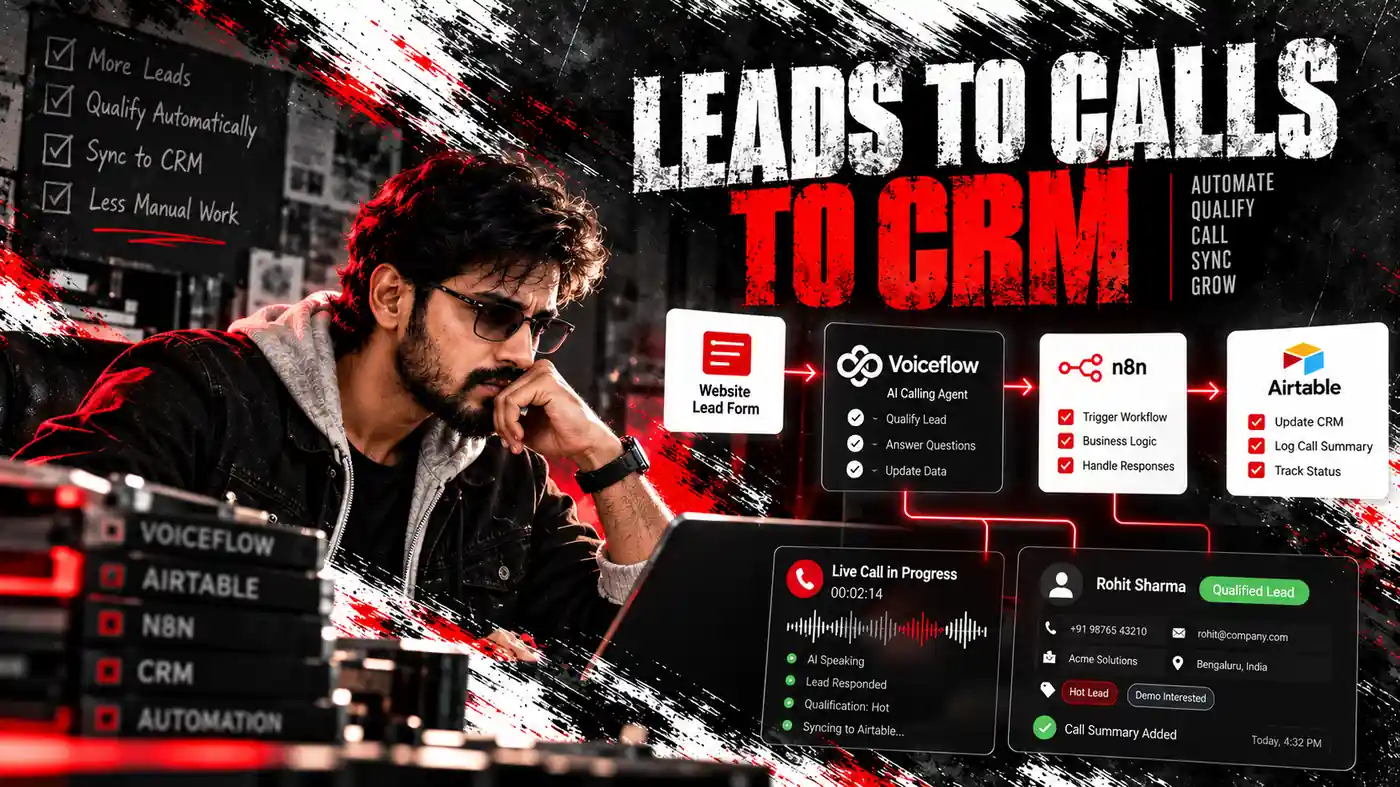
My team uses Airtable to store leads, telli as the voice platform and the workflow to connect the two systems.
Four main nodes move a lead from a new row to a scheduled call:
| Order | Node | Job |
|---|---|---|
| 1 | Airtable Trigger | Detects a new lead with consent ticked |
| 2 | HTTP Request to telli, add contact | Creates a contact and returns its telli contact ID |
| 3 | HTTP Request to telli, schedule call | Schedules the call with the selected voice agent and call window |
| 4 | Airtable update record | Saves the contact ID and changes the status to Call scheduled |
Airtable stores the lead and consent record. telli manages the voice, call logic, retries and transcript. The workflow moves information between them in the required order.
After the call, telli stores the outcome and transcript. My team usually adds another small workflow that brings the result back into Airtable.
Example:
The sales person sees Interested, wants a demo on Saturday beside the lead. They can understand the next action without opening the voice platform.
That result-sync path keeps the system practical for the person doing the follow-up.
A four-node chain is enough for a business receiving a few dozen leads each day. When the volume reaches hundreds, my team adds a queue so calls are distributed across the approved calling window rather than beginning together.
Why build the Airtable CRM before n8n?
Bad lead data creates failed calls.
A phone number stored as 98480 12345 may fail where +919848012345 works. The automation cannot reliably schedule a call unless the phone field uses the format expected by telli.
This is the Airtable CRM structure I begin with:
| Field | Type | Purpose |
|---|---|---|
| Name | Single line text | Lets the agent greet the person |
| Phone | Phone, in +91 format | Gives telli the international phone format |
| Supports follow-up after the call | ||
| Consent | Checkbox | Empty means no call |
| Source | Single select | Records which page or advertisement produced the lead |
| Interest | Long text | Gives the script context about the enquiry |
| Call window | Single select | Morning, afternoon or evening |
| Status | Single select | New, Call scheduled, Called, Interested or Not interested |
| telli contact ID | Single line text | Connects the Airtable row with the telli contact |
| Created | Created time | Lets the trigger identify new records |
Facebook lead ads, Google forms and website forms can all feed the same table. The AI calling agent for lead generation then works from one controlled list instead of separate spreadsheets.
Do not delete leads after the call. Change the Status.
Deleting a row breaks the link between the Airtable record and the telli contact. A Status of Not interested preserves the history and helps prevent another call.
A clean Airtable CRM also makes failures visible. The team can filter by Status instead of checking each form and advertising platform separately.
Why can’t the telli AI steps run together?
telli schedules calls for contacts, not loose phone numbers.
The schedule-call request needs the telli contact ID returned by add-contact. That ID does not exist before the first HTTP Request succeeds.
The correct order is:
- Add the person as a telli contact.
- Receive the telli contact ID.
- Schedule the call using that ID.
Reversing the nodes sends a call request without a valid contact reference.
Running both requests in parallel can create the same problem. Schedule-call may run before add-contact finishes returning the required ID.
The order also keeps future retries, calls and transcripts attached to one contact. Airtable stores the ID so both systems refer to the same person.
If add-contact fails, the workflow stops and the lead remains New. That is safer than creating a partial record or risking a repeat call.
This dependency is the central rule of the telli AI connection.
What does the complete node order protect?
The complete path runs like this:
- Airtable Trigger detects the new record.
- The workflow confirms that Consent is ticked and Status is
New. - Add-contact sends the name, phone number and email to telli.
- telli returns the contact ID.
- Schedule-call sends that contact ID and the selected agent ID.
- Airtable update record saves the ID and changes Status to
Call scheduled. - Another workflow later retrieves the outcome and transcript.
Every step protects the one after it.
Without the correct trigger field, new leads do not enter.
Without the consent filter, a number may enter even when the person did not agree.
Without add-contact, schedule-call has no contact ID.
With the wrong agent ID, the person can exist in telli while no call is scheduled.
If the final Airtable update fails, the lead may stay New. A later trigger or retry can then process the same person again.
I test the chain using personal numbers before any real lead enters it.
What normally breaks?
Most failures begin with data or configuration rather than the voice.
| Problem | Likely cause | Check |
|---|---|---|
| No lead receives a call | Airtable Trigger watches the wrong field | Point it to the Created time field |
| telli returns 401 | API key is missing, expired or contains an extra space | Re-enter it in credentials |
| Add-contact returns a validation error | Phone number is not in +91 format | Correct the Airtable field or add formatting |
| Contact exists but no call starts | Schedule-call failed or uses the wrong agent ID | Inspect the node output in executions |
| One person receives two calls | Trigger runs on edits rather than new rows | Filter for Status = New and update it after scheduling |
| Calls happen at the wrong time | The workflow ignores the calling window | Use the lead’s selected window and permitted hours |
I also add an error branch that alerts the team through WhatsApp or email when a node fails.
Without that branch, the workflow can remain broken while the owner assumes leads are being contacted.
A weekly check provides another safety net. Filter Airtable for leads with Status New that are older than a day.
Missing consent or invalid phone numbers often point to a problem in the enquiry form. Correcting the form prevents the same error from reaching future records.
How do you build the voice call AI agent n8n workflow?
A founder comfortable with the workflow platform can build this workflow directly.
- Create the Airtable base with the listed fields.
- Add a consent checkbox to every form that sends leads into Airtable.
- Create a telli account.
- Configure the voice agent and approved script.
- Create a telli API key.
- Add the Airtable credential in the workflow platform.
- Add the telli API key as a header credential.
- Create an Airtable Trigger for the leads table.
- Filter for Consent ticked and Status
New. - Add the add-contact HTTP Request and map the name, phone number and email.
- Add the schedule-call HTTP Request using the returned contact ID and agent ID.
- Add the Airtable update node to store the contact ID and set Status to
Call scheduled. - Test with your own number and the numbers of two colleagues.
- Confirm that call results and transcripts return to Airtable.
Read the current telli API documentation for the exact endpoint names and fields. APIs can change, so the latest platform documentation should control the setup.
One successful call is not enough testing. Watch real executions for a few days and read the transcripts.
Questions that look clear in a script may confuse a person during a call. Transcript review shows which wording needs to change.
The voice call AI agent setup remains small because the workflow does not manage the call itself. It moves the lead into telli, records the result and keeps the sales team’s view updated.
What should the call sound like?
The call should be short, transparent and easy to leave.
Example:
“Hello, this is an automated assistant calling from Sunrise Academy about the enquiry you made for the data science course. Is this a good time for two minutes? … Great. Are you looking to start this month or later? … Would you like our counsellor to call you with batch timings? … Thank you. If you ever don’t want these calls, just say so and we’ll stop.”
This is an illustrative script, not a recording or client result.
The opening identifies the caller as automated. It asks if the person can speak and explains how to stop future calls.
The agent should normally ask three or four focused questions. Long interviews can make leads leave the call.
The goal of an AI calling agent for lead generation is not to close the sale without a person. It should identify who is interested, who wants a later conversation and who does not want to continue.
The counsellor or salesperson can then focus on the leads who asked for human follow-up.
How do you calculate the AI calling agent price in India?
The AI calling agent price in India is not one monthly number.
The full cost can include four services and setup work:
| Cost area | What changes it | How to control it |
|---|---|---|
| Voice AI platform | Call minutes, plan and number of agents | Keep scripts short and call only consenting, relevant leads |
| Phone number and telephony | Number country and per-minute rates | Confirm Indian number support and rates before signing |
| n8n | Cloud plan or an existing server | Self-host when the business already operates a server |
| Airtable | Records and seats | Archive old records; its free plan works for small volumes |
| Setup work | Script design, testing and integration | Treat it as a one-time build when configured correctly |
When a vendor gives one monthly figure, ask which of these parts it includes.
Confirm the per-minute rate to Indian mobile numbers. Ask whether Hindi or regional-language voices use different pricing.
These answers can change the practical AI calling agent price in India more than the large figure printed at the top of a pricing page.
Compare that total with the value of a missed lead. If an enrolment, property visit or B2B demo is worth several thousand rupees, recovering leads that would otherwise go cold may justify the running cost.
The business should calculate that value before paying for any voice platform.
How do you choose the best AI calling agent in India?
There is no single best AI calling agent in India for every business.
I use telli for this build because its API is simple to connect with the workflow platform. The final platform decision should still come from testing the requirements that matter to the business.
Ask each provider:
- Can it reliably call Indian mobile numbers?
- What number will the person see?
- Does it support the language the leads actually use?
- How natural are its Hindi and regional-language voices?
- Can it transfer an interested lead to a person during the call?
- Does its API provide transcripts and call outcomes?
- Where is the call data stored?
- Can a person’s data be deleted on request?
- What happens when someone asks to be called later?
- What happens after a do-not-call request?
Language needs testing with real leads.
A property lead in Hyderabad may prefer Telugu. A coaching lead in Lucknow may prefer Hindi. A B2B lead in Bengaluru may choose English.
Mixed Hindi-English speech can also affect the call. A voice that performs well in a clean demonstration may struggle with the phrases customers normally use.
Test the platform with 20 real leads before making a larger commitment.
For a regulated business, the best AI calling agent in India is the one that records a do-not-call request and stops future calls. Voice quality matters, but consent control matters more.
If you want to discuss the build after comparing the cost and platform options, email upcomingtool@gmail.com with the lead source, preferred language and current follow-up process.
Treat the setup above as a working sample, not a rule. For a client, my team builds on whichever automation platform fits their business, including one they already pay for, or a custom build.
What does my team build around an AI calling agent for lead generation?
The calling chain needs supporting work before it becomes a dependable sales process.
My team provides:
- A review of the lead sources, consent language and calling windows.
- A structured Airtable base.
- A call script written for the business and audience.
- Testing before real leads enter.
- The four-node calling workflow.
- Another workflow for returning outcomes and transcripts to Airtable.
- Error alerts for failed records.
- A handover showing the team how to read outcomes and follow up.
The workflow runs through the client’s n8n, Airtable and telli accounts. The client owns the automation and data after handover.
A calling workflow like this is normally ready in 7 to 10 days, with a week as the shortest realistic time.
Bigger set-ups, such as several lead sources or special calling rules, depend on your needs, which we confirm over calls and emails. I explain the plan by phone and again on Zoom, sharing my screen so you can watch it take shape.
Ongoing support is optional rather than a required monthly fee to my team.
The about page explains who is behind UpcomingTools. The refund policy covers the terms for paid implementation work before the build begins.
Myth: the AI should call every number and close the sale.
Reality: it should call consenting leads, qualify them and pass the right people to a human.
Reality check: if that boundary is clear, use the contact page to map the workflow.
