
About Us
The argument in favor of using filler text goes something like this: If you use real content in the Consulting Process, anytime you reach a review point you’ll end up reviewing and negotiating the content itself and not the design.
AI product video for small shops: how a gift shop turned plain phone photos into a cinematic catalogue that sells across every channel
AI product video for small shops: how a gift shop turned plain phone photos into a cinematic catalogue that sells across every channel
Ecommerce Product Photography From a Phone: Turn Shop Photos Into AI Product Videos
Most small shops have hundreds of products and photos of almost none of them. Customers now ask on WhatsApp before they walk in: do you have this, what does it look like, what does it cost? The shop that replies with a clear picture usually gets the sale. A professional shoot is expensive, and by the time it is done, half the stock has changed.
Ecommerce product photography does not have to start in a studio. A phone, a window and a plain cloth are enough for the only manual step. The workflow does the rest: it checks the photos, writes the catalogue entry, cleans the main image, makes a short product video and keeps the catalogue in step with stock. This guide explains each step, the rule that keeps the images honest, and where the results get used. It belongs to our guide on automation in retail.
Ecommerce product photography starts with one manual step
- Use an ordinary phone camera. No studio lights or photographer.
- Lay a plain cloth on the counter near a window, for soft daylight. This is the only one of the usual product photography backdrops a small shop needs.
- Take five or six photos of each product: front, back, top, bottom, and a close-up of any detail that matters, such as carving, engraving or a label.
- Shoot one product at a time, and keep the product code from the shop register handy.
At this pace, one person can cover 20 to 30 products an hour. A few products every day works better than a huge batch before a festival, because every image still needs a quick look.
How the workflow builds the catalogue
This is the working workflow in n8n, in two parts.
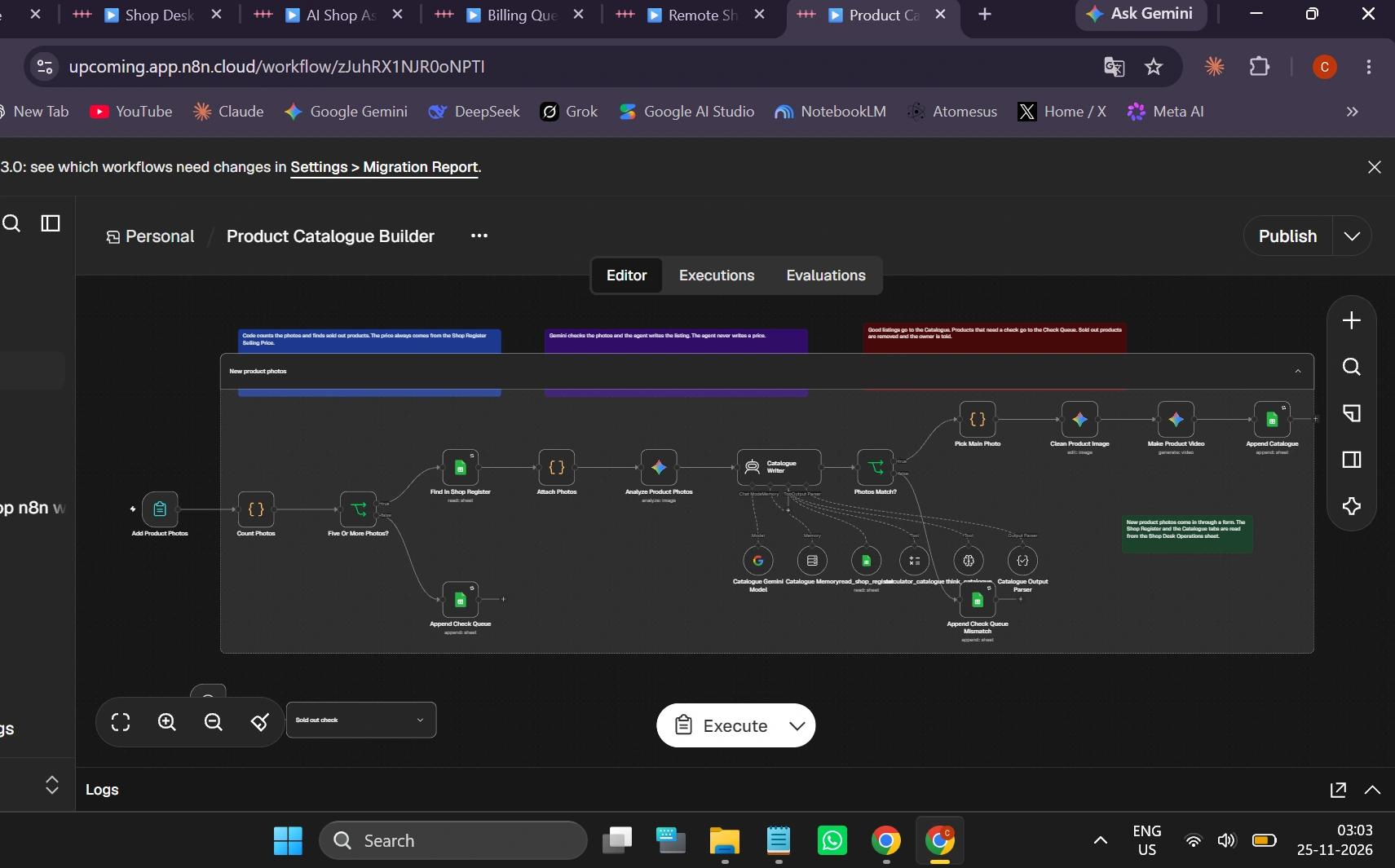
Photos in. Staff open a simple form on the shop phone, enter the product code and upload the photos. A code step counts them; with fewer than five, the product goes to the Check Queue with the reason, and nothing else happens.
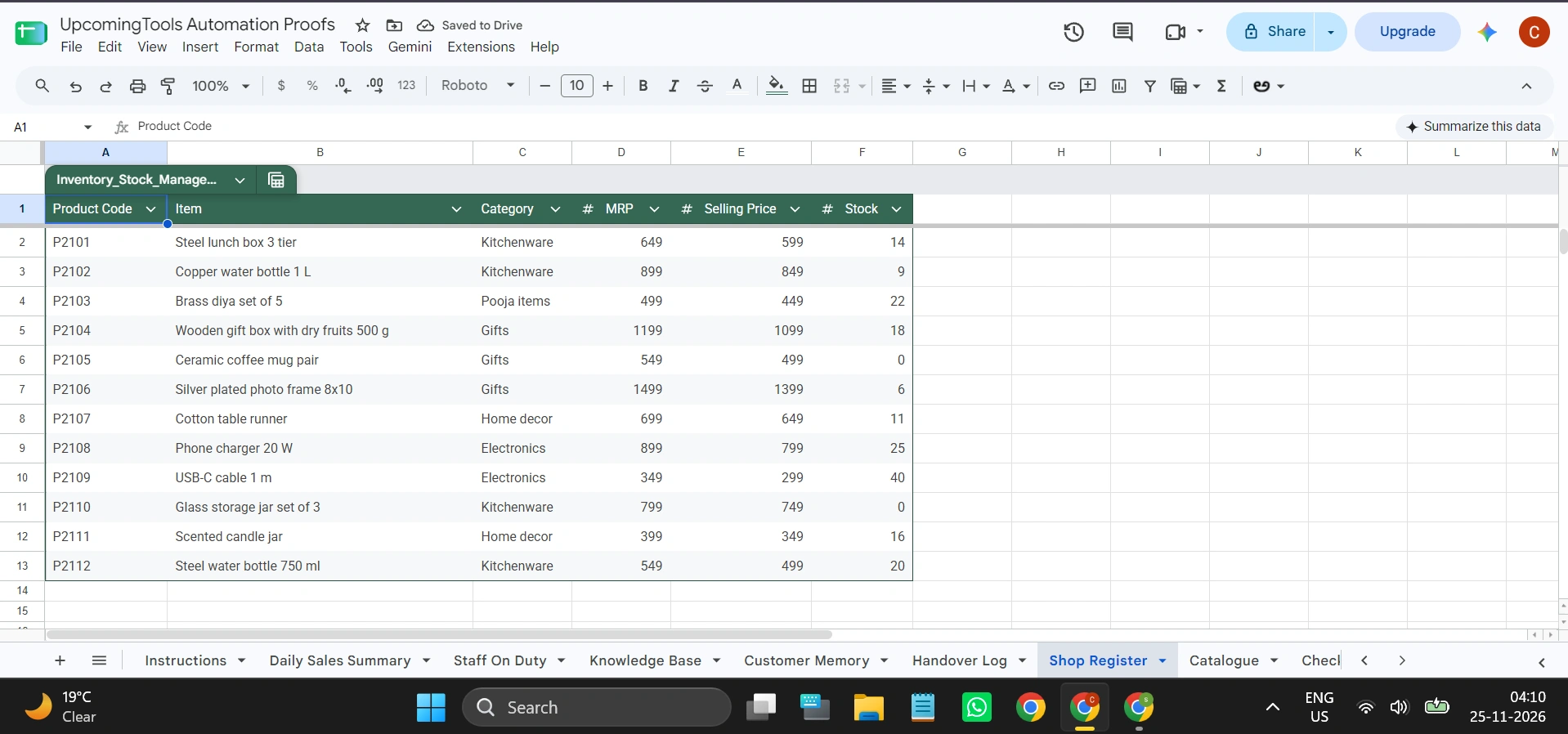
Product details from the register. The workflow finds the product in the Shop Register tab. The price always comes from the register’s selling price, never from the AI.
Photo check and listing. Gemini looks at all the photos together. A Gemini AI agent then writes the listing: a name, a short description under 15 words, search words and a category. The same agent returns a consistency answer: Match only if every photo shows the same product in the same colour and shape; otherwise Check. The agent has memory for the run, a read-only tool for the Shop Register and a structured output format.
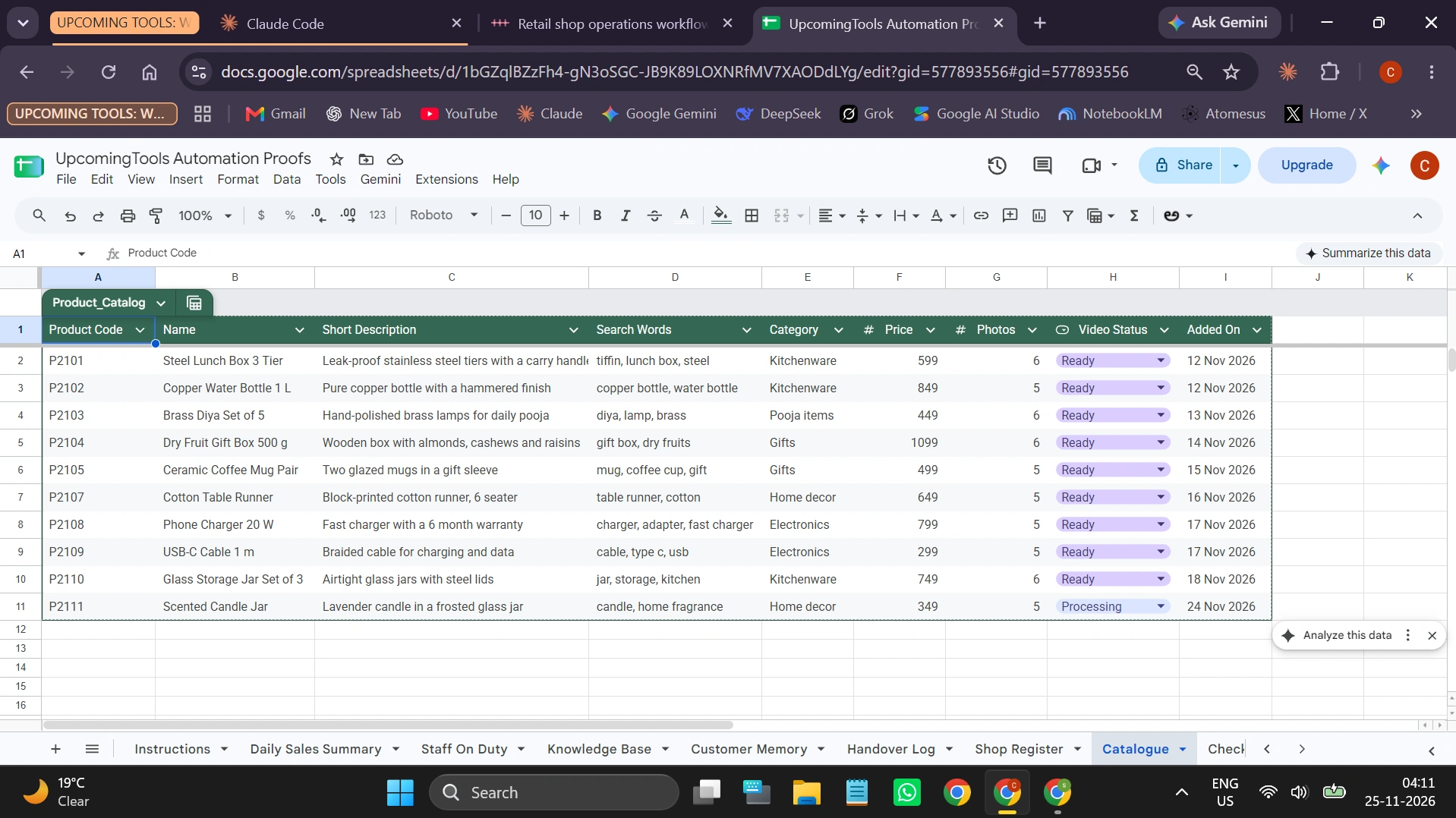
Image and video. When the photos match, the workflow picks the main photo and Gemini cleans it: it removes the cloth and shadows, corrects the light and places the product in a fitting setting. This is where creative product photography happens without a set, a wooden gift box on a warm table, a steel lunch box on a clean kitchen counter. Gemini then turns the images into a short clip of about 8 to 15 seconds, with slow camera movement and gentle light. The listing, price, photos and video status are added to the Catalogue tab.
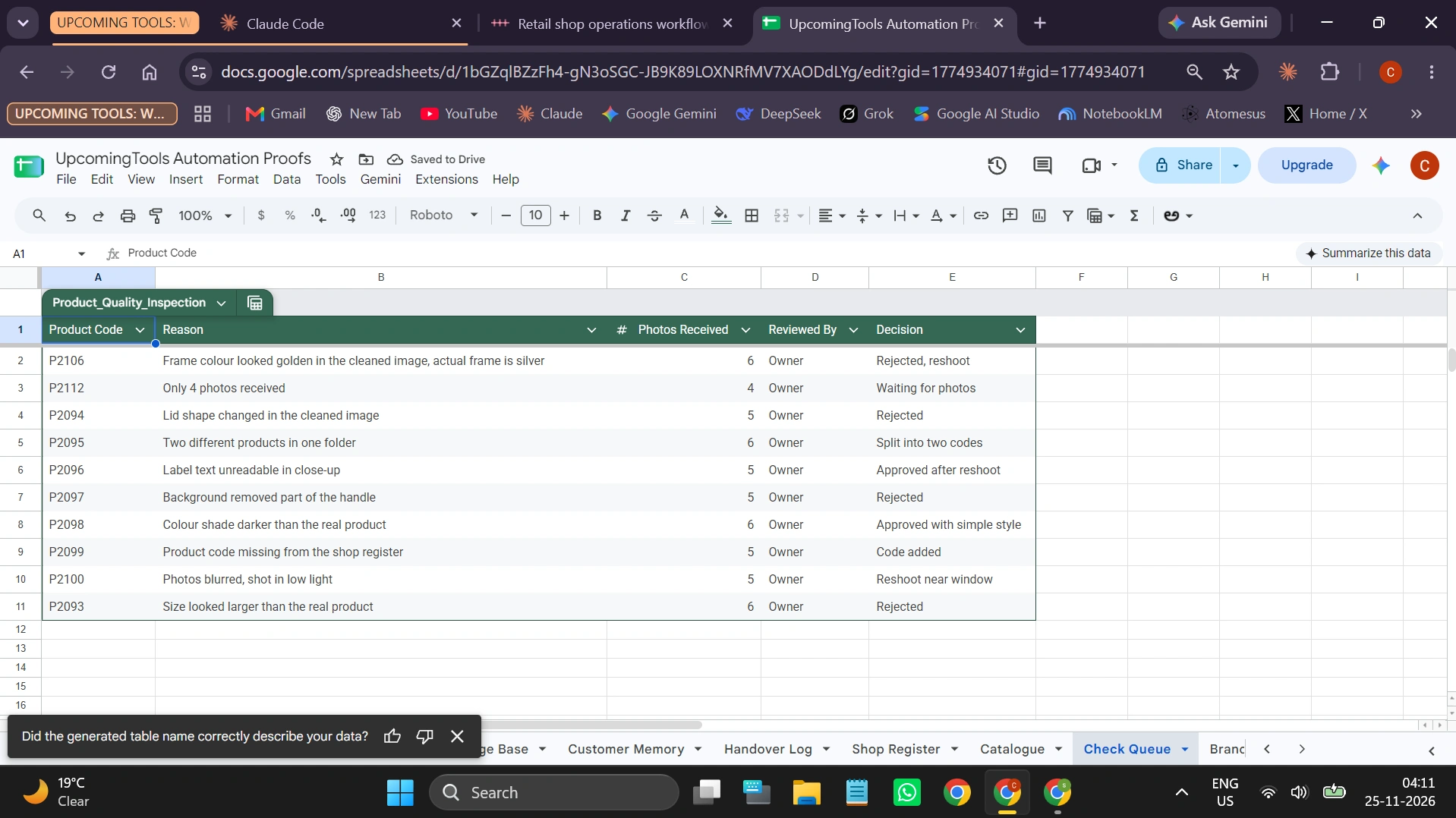
Doubtful photos. When the photos do not match, the product goes to the Check Queue with the reason, and nothing is published until someone looks at it. The Gemini API documentation covers image and video generation, and the n8n documentation covers the form, Google Sheets and AI Agent steps.
Proof of our work on real dashboards
Here is the catalogue workflow at work: the shop register it takes prices from, the catalogue it builds from phone photos and the check queue that stops a wrong image going live. My team built it and ran it with sample data on a long night, well past midnight, until the check queue caught every mismatch we threw at it. Open the same tabs in our public automation proofs sheet.
If you sell from a small shop or from home and cannot pay for a photographer or a catalogue tool, write to contact@upcomingtools.com or comment below. We will set this up for you free, with no long forms. Brands and established sellers who want custom photo styles and channels can contact us through custom services.
The rule that keeps the images honest
The product itself must never change. Shape, colour, size and every detail must match the original photos. The AI may change only the background, the light and the mood. Plain everyday items, such as steel boxes, look odd in dramatic scenes, so they get a simpler, cleaner style.
The Check Queue is where this rule is enforced. A silver frame that comes out looking golden, a lid that changes shape, a colour shade darker than the real product: all of these go to the queue and stay unpublished. Someone in the family reviews the queue every week and either approves, asks for a reshoot or rejects the image. A customer who receives exactly what they saw in the video comes back.
Keeping the catalogue in step with stock
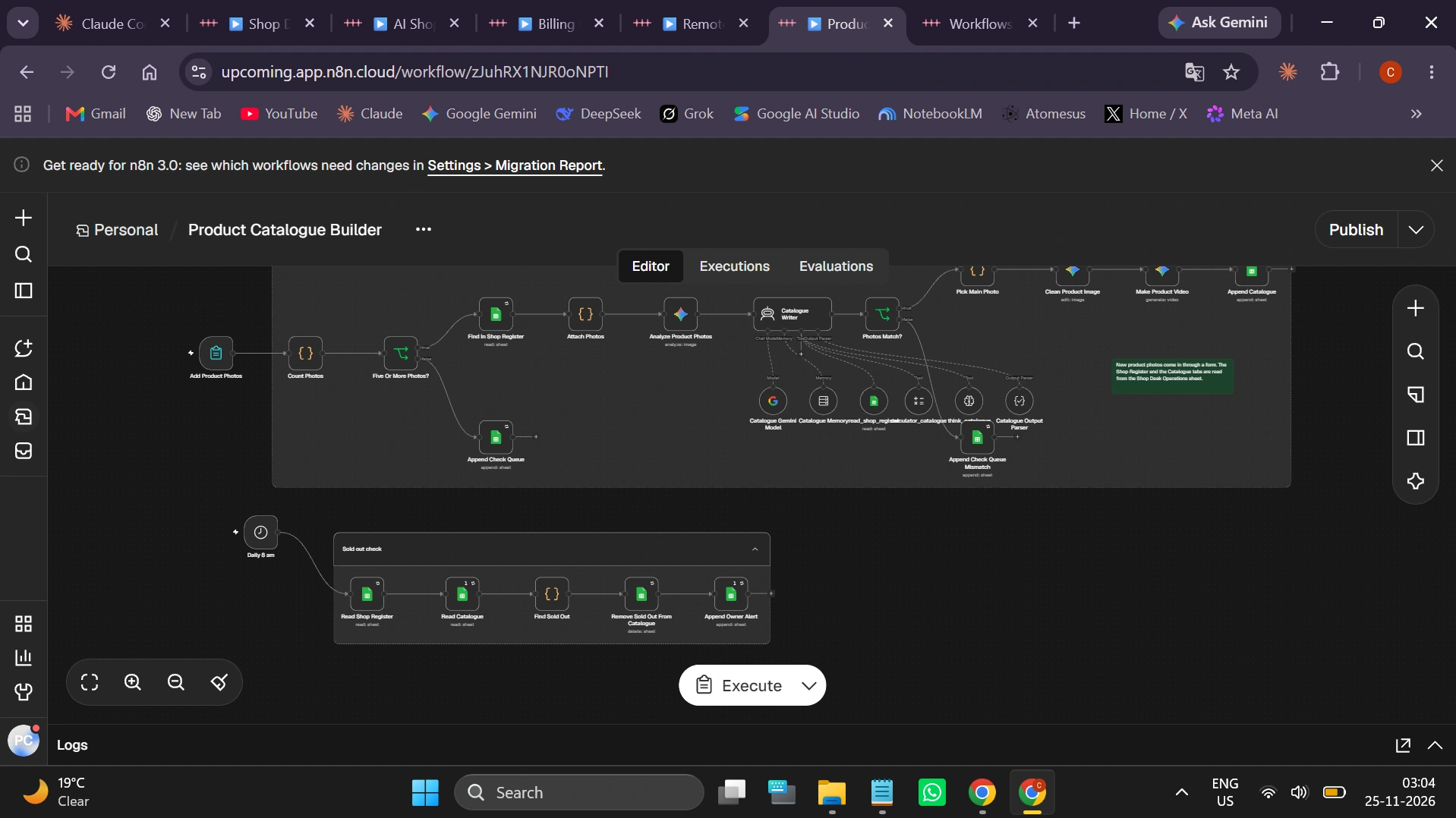
Every morning at 8 am, the second part of the workflow reads the Shop Register and the Catalogue, finds products whose stock has reached zero, removes them from the catalogue and writes an Owner Alert listing what was removed. Customers never see something they cannot buy, and staff stop showing sold-out items.
Where the photos and videos are used
| Channel | How they are used |
|---|---|
| Counter and staff phones | A searchable catalogue to show customers in about 30 seconds |
| Messaging catalogue and broadcasts | New arrivals and updates for regular customers |
| Replies to enquiries | Two or three matching videos instead of a long description |
| Social media and festival posts | Fresh festival-setting videos for slow-moving stock |
| Online marketplaces | The same images and videos reused for listings |
Product photography for ecommerce listings is then the same set the shop already made for its own counter, so selling online becomes a matter of uploading, not reshooting. Local shops can also reach online buyers through India’s open network, ONDC, and a WhatsApp catalogue is a sensible first step before a website. For shops with a WooCommerce store, the catalogue entries feed straight into bulk product upload with AI-written titles.
What ecommerce product photography costs this way
The phone, the form and Google Sheets cost nothing. The Gemini steps are paid by use: checking photos and writing listings costs very little, while image cleaning and video generation cost more per product, so many shops make videos only for their best sellers and festival stock. Check current pricing before converting a whole catalogue.
What still needs a human
Shooting the photos, reviewing the Check Queue, setting prices and deciding which products deserve a festival push all stay with people. Slow-moving stock sells better with fresh videos made for a local festival than with discounts alone, and items that have stopped selling entirely are better handled as dead stock bundles. The same product knowledge can also power an AI shop assistant that trains staff. My team sets up the photo-to-catalogue flow and supports eligible beginners through Starter Support.

I am Radhakrishna, Founder and lead author at UpcomingTools.com, where I write Business Guides and Automation Guides for low investment automation in India. With 3 to 5 years offline experience serving small businesses only through trust and referrals, I now build software only workflows for lead follow up, bookings, quotes, stock, invoices and reporting and fix failed runs, expired tokens and unsafe AI and RAG answers. Every guide and workflow is written and decided by me, personally checked and live tested before publishing. I build in your own accounts on live, so your keys stay yours, show a rough demo before build and give 3 to 6 months free support with free tool help and ZERO SERVICE CHARGE for eligible starters.
2 Comments
[…] GST enrolment number and watches for wrong-return claims on marketplaces. Finished uniforms go into AI product videos and catalogue photos, and schools that pay late get a polite payment reminder. Women starting their own label can read […]
[…] without the owner. I also wrote recently about how a gift shop turned simple phone photos into an AI product video catalogue, which works well alongside everything […]