
About Us
The argument in favor of using filler text goes something like this: If you use real content in the Consulting Process, anytime you reach a review point you’ll end up reviewing and negotiating the content itself and not the design.
Sales Target Pacing Automation and a Month-End Sales Forecast by 4 PM Every Day
Sales Target Pacing Automation and a Month-End Sales Forecast by 4 PM Every Day
Monthly Sales Target Pacing Automation That Shows the Daily Gap
Most shop owners find out they missed their monthly sales target on the last day of the month, when nothing can be done about it. Through the month, the only check is a rough feeling: half the month gone, is half the target done? That feeling is wrong more often than it is right, and by the time it turns into worry, there are only a few selling days left.
Sales target pacing replaces the feeling with a forecast at 4 pm every day, built from the shop’s own pattern, and with the one number that matters: how much the shop needs to sell on each remaining day. This guide explains the method, the working workflow behind it, and how to tune it. It belongs to our guide on automation in retail.
Why “half the month, half the target” misleads
No shop sells evenly. Weekends are busier, the week after payday is stronger, the last week before payday is weaker, and closed days earn nothing. A shop that has done 45% of its monthly sales target by the 15th may be perfectly on track if its strongest weekends are still ahead, or badly behind if it has just had its best week. Comparing against a straight line punishes good months and hides bad ones.
The only fair comparison uses the shop’s own pattern: what each weekday usually brings in, and how much of a normal day’s sales usually happen before 4 pm.
The four tabs the forecast reads
Everything sits in one Google Sheet:
| Tab | What it holds |
|---|---|
| Sales Targets | One row per month: Month, Target and Holidays, listing closed or half-closed dates |
| Sales | The daily billing export: Date, Hour, Bill Number, Amount, Category |
| Actions Menu | A short list the owner writes of actions the shop is willing to take when behind, such as calling regulars or moving a slow category to the front |
| Pacing Log | Every day’s status, forecast and the action suggested, used to avoid repeating actions and to review what worked |
How the forecast works
Projecting today. At 4 pm, the day is not over. The workflow looks at the same weekday over the last 60 days and works out what share of that day’s sales usually came before 4 pm. Today’s sales so far are divided by that share to project a full day. If almost nothing usually sells before 4 pm on that weekday, it uses today’s sales as they are, rather than inflating a tiny number.
Projecting the rest of the month. Each remaining day gets the average sales of its weekday over the last 60 days. Dates listed as holidays count as zero.
The forecast and the gap.
- Forecast = sales till yesterday + today projected + the remaining days
- Needed per day = (target − sales till yesterday − today projected) ÷ days left
| Status | Forecast as a share of target |
|---|---|
| Green | 100% or more |
| Amber | 95% to just under 100% |
| Red | Below 95% |
The Amber band exists because a shop at 99% does not deserve an alarm.
Example, with illustrative numbers: the monthly sales target is ₹12,00,000 and today is the 12th of a 30-day month. Sales till yesterday are ₹4,10,000. By 4 pm the shop has sold ₹21,000, and on this weekday 60% of sales usually happen before 4 pm, so today projects to ₹35,000. The remaining 18 days add up to ₹7,20,000 at their weekday averages. The forecast is ₹11,65,000, which is 97% of target. The status is Amber, and the shop needs about ₹41,900 per remaining day to close the gap.
The monthly sales target workflow at 4 pm
This is the working workflow, built in four stages.
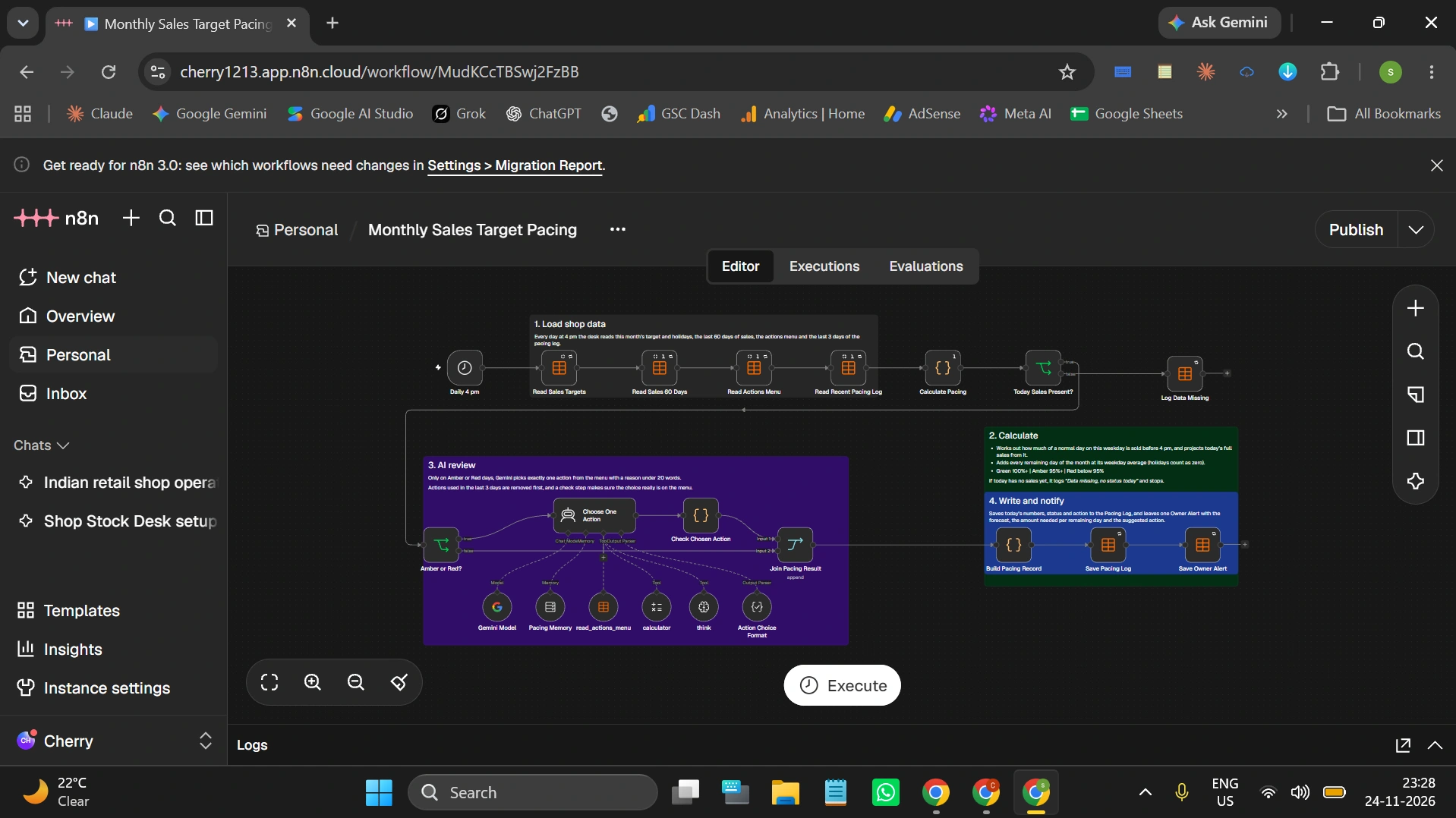
1. Load shop data. At 4 pm on open days, the workflow reads the month’s target and holidays, the last 60 days of sales, the actions menu and the last three days of the pacing log.
2. Calculate. A code step works out today’s projection, the remaining days, the forecast, the status and the amount needed per day. If today has no sales at all yet, the billing export is probably missing, so it logs “Data missing, no status today” and stops. A false Red is worse than no message, because an owner who gets two wrong alarms stops trusting the system.
3. AI review, only on Amber or Red days. On a Green day the workflow skips straight to writing the result. On an Amber or Red day, a Gemini AI agent picks exactly one action from the owner’s menu, with a reason under 20 words. Actions used in the last three days are removed first, and the agent prefers a category that is selling below its usual share. It has memory for the run, a read-only tool for the actions menu, a calculator and a structured output format. A check step then confirms the chosen action really is on the menu; the AI never invents a discount or an action of its own.
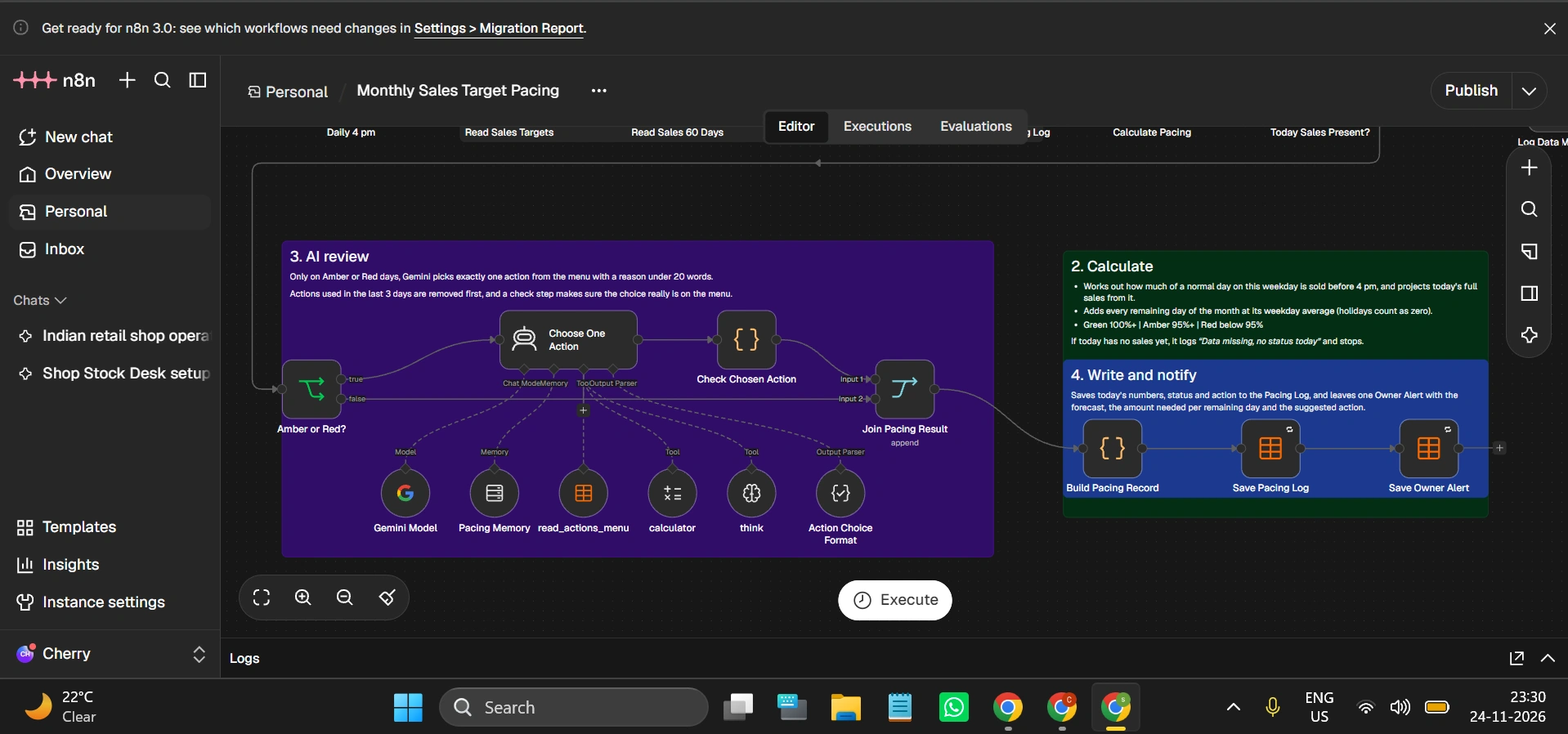
4. Write and notify. The day’s numbers, status and action are saved to the Pacing Log, and one Owner Alert is written with the forecast, the amount needed per remaining day and the suggested action. The n8n documentation covers the schedule, IF, code and AI Agent steps used here.
Testing on months that already ended
Before going live, run the forecast over the last four months, giving each day only the data that existed at 4 pm that day, and compare it with how each month actually finished. Two adjustments usually come out of this:
- In the first five days, blend the weekday averages with the actual pace so one large bill cannot flip the status.
- If the first week after payday is always stronger, add that uplift to dates 1 to 7.
A good forecast is within a few percent of the final figure by the 10th and close enough to trust by the 20th.
Setting next month’s target from this month’s pace
On the last day of the month, the same numbers give a realistic floor for next month: next month’s days at this month’s weekday averages, with its own weekends and holidays counted properly. Add the stretch on top of that floor instead of picking a round number. A target built this way is one the team can actually see itself reaching.
Mistakes that make pacing useless
- Counting closed days as selling days, which makes every forecast look too good. Fill the Holidays column.
- Ignoring the hour of the day, which makes every afternoon look like a bad day. The before-4-pm share fixes this.
- Letting the AI choose freely, which leads to invented discounts. Keep it to the owner’s menu.
- Never reviewing the Pacing Log. At month end, remove actions that never moved the number.
Where pacing connects with the rest of the shop
When the status turns Amber, the fastest money is usually already in the customer list: calling a few drifting regulars from VIP repeat customer detection often closes a small gap within days, and cross-sell suggestions at the billing counter lift the average bill without extra footfall. Owners who are away can read the same alert alongside their remote shop management closing summary. For shops just starting, my team offers a free formula-only version in Google Sheets through Starter Support.

I am Radhakrishna, Founder and lead author at UpcomingTools.com, where I write Business Guides and Automation Guides for low investment automation in India. With 3 to 5 years offline experience serving small businesses only through trust and referrals, I now build software only workflows for lead follow up, bookings, quotes, stock, invoices and reporting and fix failed runs, expired tokens and unsafe AI and RAG answers. Every guide and workflow is written and decided by me, personally checked and live tested before publishing. I build in your own accounts on live, so your keys stay yours, show a rough demo before build and give 3 to 6 months free support with free tool help and ZERO SERVICE CHARGE for eligible starters.
3 Comments
[…] at the billing counter. Bringing back even a few drifting VIPs each week shows up quickly in monthly sales target pacing. A free, sheet-based version is something my team sets up for eligible beginners through Starter […]
[…] customers is another, which is what VIP repeat customer detection does. Both show up quickly in monthly sales target pacing. Shorter lines also give cashiers time to say the line at all, which is why many shops pair this […]
[…] A second Gemini agent writes this into a short closing message, which is saved as an Owner Alert. The owner reads it once at night instead of calling the shop all day. For month-level tracking, the same numbers feed monthly sales target pacing. […]