
About Us
The argument in favor of using filler text goes something like this: If you use real content in the Consulting Process, anytime you reach a review point you’ll end up reviewing and negotiating the content itself and not the design.
VIP Customer Detection Automation and Repeat Customer Scoring for Weekly Calls
VIP Customer Detection Automation and Repeat Customer Scoring for Weekly Calls
VIP Customer Detection: Score Repeat Customers by Recency, Frequency and Value
Every shop has a small group of repeat customers who bring in a large share of its money. The trouble is that nobody notices when one of them quietly stops coming. There is no complaint and no warning, just a familiar face that does not return, and by the time the owner thinks “I haven’t seen her in a while”, the habit has already moved to another shop.
VIP customer detection finds those people in the bills every week and tells the owner who to call before the habit is lost. This guide covers how the scoring works, how a drifting regular is spotted, and how the weekly call list is built in n8n with a Gemini AI agent. It is one of the setups in our guide to automation in retail.
Why repeat customers slip away unnoticed
A shop sees hundreds of faces a week. Staff change shifts, the owner is not always at the counter, and nobody keeps track of how often each regular comes. A customer who used to visit every two weeks can be gone for two months before anyone realises. The bills, however, remember everything: every visit, every amount, every gap. The problem is not missing data; it is that nobody reads it.
Scoring repeat customers with three numbers
The method is the classic RFM scoring used in retail, adapted to a small shop’s bill export. For every cleaned customer phone number in the last 90 days of bills:
| Measure | How it is calculated |
|---|---|
| Recency | Days since the last purchase bill |
| Frequency | Number of purchase bills in the window |
| Value | Average bill amount |
Each measure is ranked against the shop’s own customers and turned into a score from 1 to 5, with recency reversed so that fewer days scores higher. The total runs from 3 to 15:
| Group | Total score |
|---|---|
| VIP | 12 or more |
| Regular | 7 to 11 |
| Occasional | Below 7 |
Scoring against the shop’s own customers, instead of fixed rupee amounts, matters. A ₹2,000 bill is huge in a stationery shop and small in an electronics showroom. Check the cut-offs once by making sure the customers the owner already knows as the best land in the VIP group.
Spotting a VIP who is drifting
Each customer gets a usual gap: the median number of days between their purchase bills. A VIP is flagged as drifting when the days since their last bill are more than twice their usual gap and at least 30 days.
Example, with illustrative numbers: a customer usually buys every 18 days and scores 14. Their last bill was 45 days ago. Twice the usual gap is 36 days, and 45 is more than that and more than 30, so they appear on this week’s list. A customer who buys every 60 days and was last seen 45 days ago is not flagged, because for them that is normal.
Cleaning phone numbers comes first
Most of the real work is in the phone numbers. The workflow strips spaces and symbols, removes a leading 91 from 12-digit numbers and a leading 0 from 11-digit numbers, and keeps only clean 10-digit numbers. Bills without a phone number are left out. When one number carries clearly different names, such as a family sharing a phone, it is marked Check Name and kept off the call list rather than merged. Repair bills are counted separately and kept out of the purchase scores, so a customer who only comes for repairs does not look like a big buyer. Anyone who has asked not to be called is marked Do Not Call and never appears again.
The weekly workflow, stage by stage
This is the working workflow. It runs every Sunday at 8 am and is split into four stages.
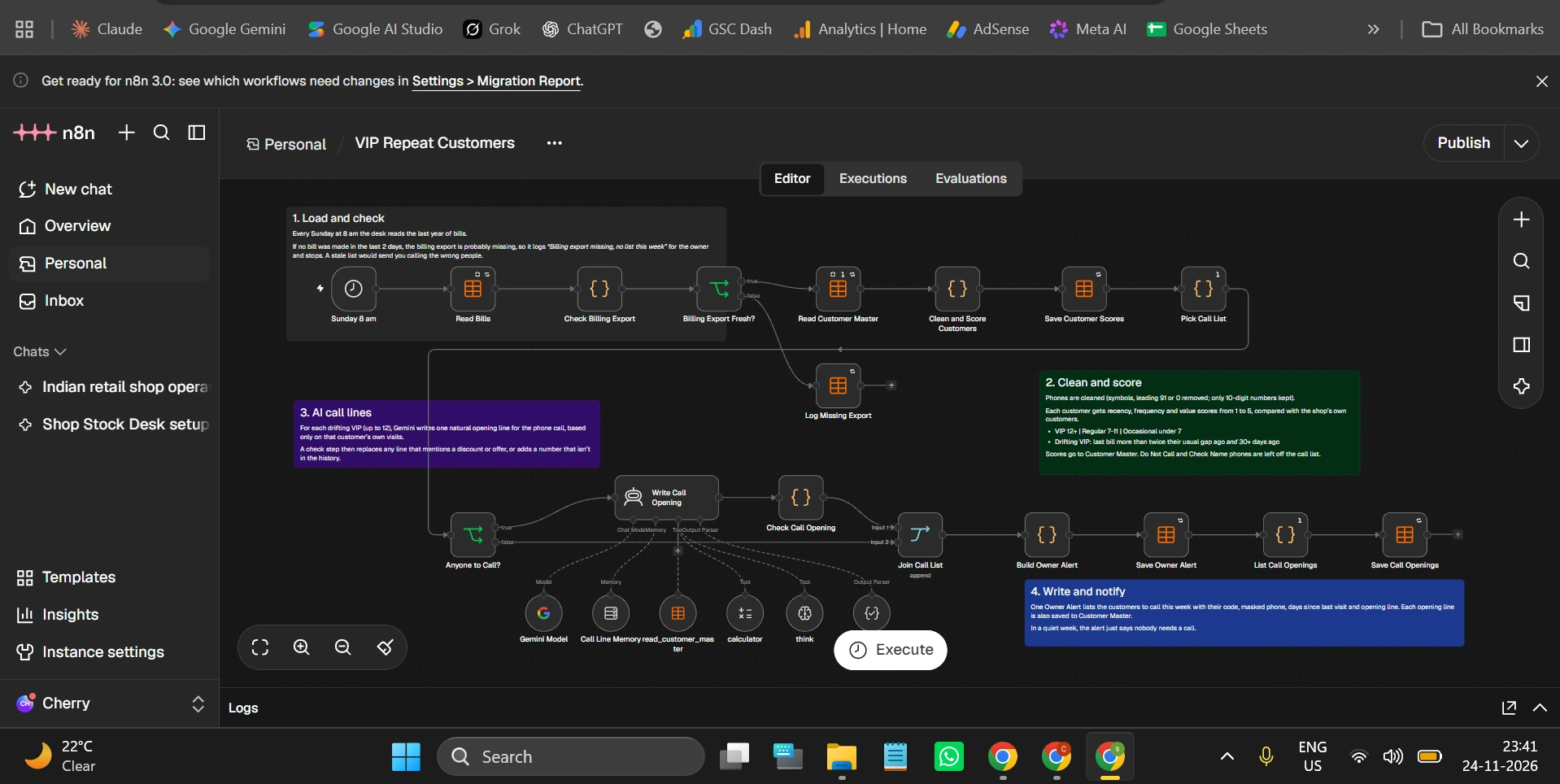
1. Load and check. The workflow reads the last year of bills and checks that the billing export is fresh. If no bill was made in the last two days, the export is probably missing, so it logs “Billing export missing, no list this week” for the owner and stops. A stale list would send the owner calling the wrong people.
2. Clean and score. It reads the Customer Master tab, cleans the phone numbers, gives every customer their recency, frequency and value scores, saves the scores back, and picks the drifting VIPs, up to 12 a week.
3. AI call lines. For each drifting VIP, a Gemini AI agent writes one natural opening line for the phone call, based only on that customer’s own visits. It has memory for the run, a read-only tool for the Customer Master, a calculator and a structured output format. A check step then replaces any line that mentions a discount or an offer, or adds a number that is not in the customer’s history.
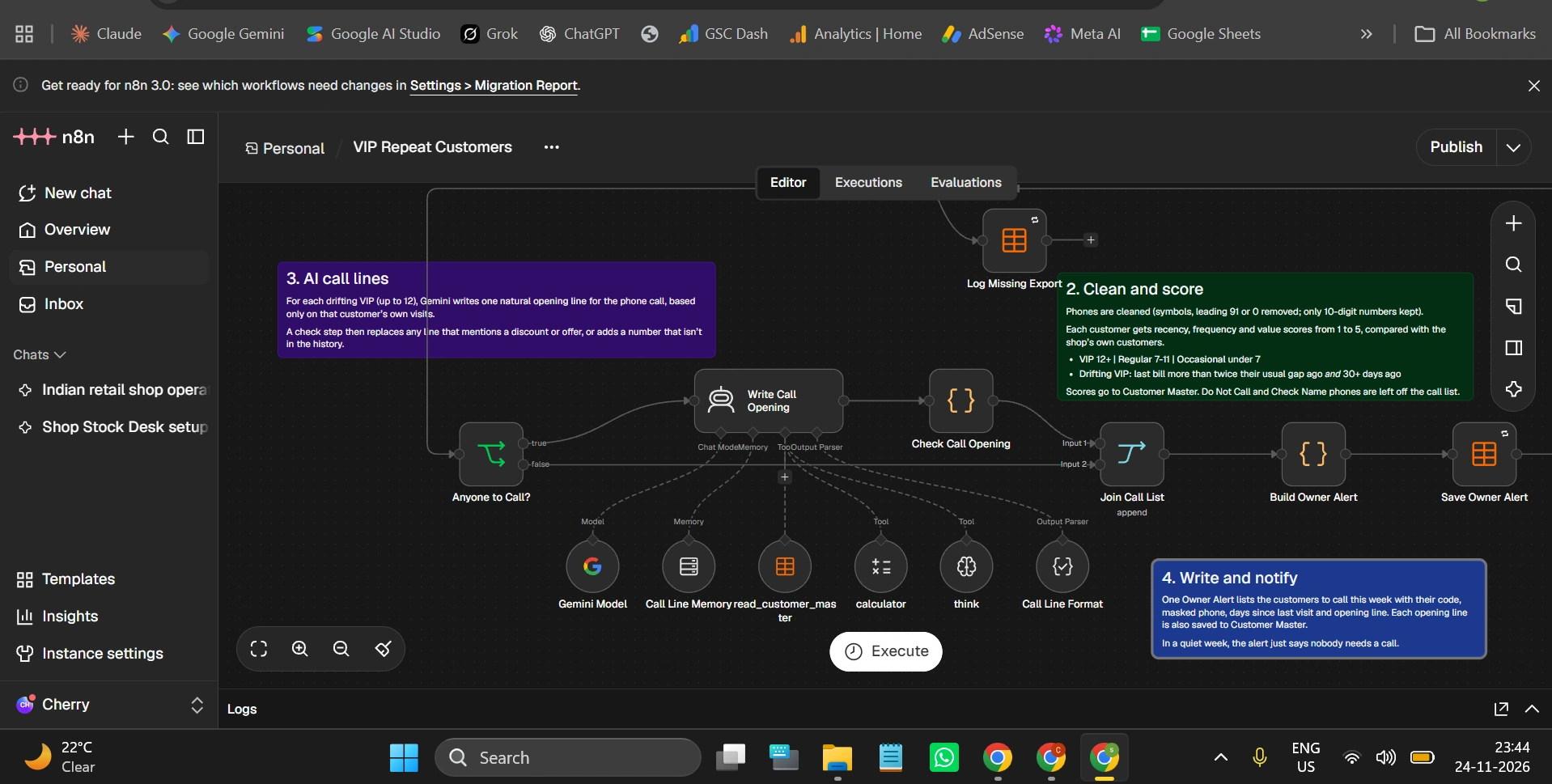
4. Write and notify. One Owner Alert lists the customers to call this week with their code, masked phone number, days since the last visit and the opening line. Each line is also saved to the Customer Master, so nobody is called twice in the same week. In a quiet week, the alert simply says nobody needs a call.
The n8n documentation covers the schedule, Google Sheets, code and AI Agent steps used here.
Retail marketing automation that stays personal
This is retail marketing automation in its most useful form: the system finds the right few people, and a person makes the call. The list is never used for bulk promotions or mass messages. Broadcast offers belong in a separate, opt-in channel, and WhatsApp broadcasts have their own delivery rules anyway.
When asking for phone numbers at the counter, tie the request to a real benefit, such as linking the warranty to the bill, and never ask twice.
Adjusting it to your kind of shop
- Daily-visit shops, such as dairies and bakeries: run it twice a week, because a regular who skips four days is already unusual.
- Rare, high-value purchases, such as jewellery or furniture: widen the window to 365 days.
- A list that is always long: cap it at the top 10 by value, and look for a wider cause, such as a stock or service problem, because many drifting regulars at once is a signal in itself.
Where VIP detection fits with the rest of the counter
Repeat customers are also the ones most likely to accept a sensible suggestion, so VIP detection pairs naturally with cross-sell suggestions at the billing counter. Bringing back even a few drifting VIPs each week shows up quickly in monthly sales target pacing. A free, sheet-based version is something my team sets up for eligible beginners through Starter Support.

I am Radhakrishna, Founder and lead author at UpcomingTools.com, where I write Business Guides and Automation Guides for low investment automation in India. With 3 to 5 years offline experience serving small businesses only through trust and referrals, I now build software only workflows for lead follow up, bookings, quotes, stock, invoices and reporting and fix failed runs, expired tokens and unsafe AI and RAG answers. Every guide and workflow is written and decided by me, personally checked and live tested before publishing. I build in your own accounts on live, so your keys stay yours, show a rough demo before build and give 3 to 6 months free support with free tool help and ZERO SERVICE CHARGE for eligible starters.
7 Comments
[…] the fastest money is usually already in the customer list: calling a few drifting regulars from VIP repeat customer detection often closes a small gap within days, and cross-sell suggestions at the billing counter lift the […]
[…] coming back. The same customer list can also show which regulars have stopped visiting, through VIP repeat customer detection, and their usual purchases make cross-sell suggestions at billing more […]
[…] can watch. Customers who regularly accept suggestions are often the ones worth recognising through VIP customer detection. Shops that are not ready for live suggestions can start with a printed list of their top pairs, […]
[…] suggestion at billing, and fewer regular customers walk out and quietly drift away, which VIP repeat customer detection would otherwise flag weeks later. Owners who travel can receive queue alerts along with their daily […]
[…] a CCTV-based queue alert, and the customer list can show which regulars have stopped coming through VIP repeat customer detection. My team sets up remote store management in stages and stays with eligible beginners through the […]
[…] work for the same reason repeat-customer nudges work in a shop, which we cover in the guide to repeat customer automation. If you would rather have my team build this on your salon’s own accounts, see our custom […]
[…] My team usually builds this on the gym’s own Google account in an evening and hands it over to the trainer on a call; our custom services page explains the process. On the 1st of every month a scheduled run compares each member’s starting and current weight on the main lifts and writes one line per member to a Progress sheet. Print it only for members who agreed to be listed. Seeing their own line move is often what keeps people renewing, the same way small recognitions keep shop customers coming back in our guide to spotting and rewarding repeat customers. […]